_Last updated: 9 September 2026_
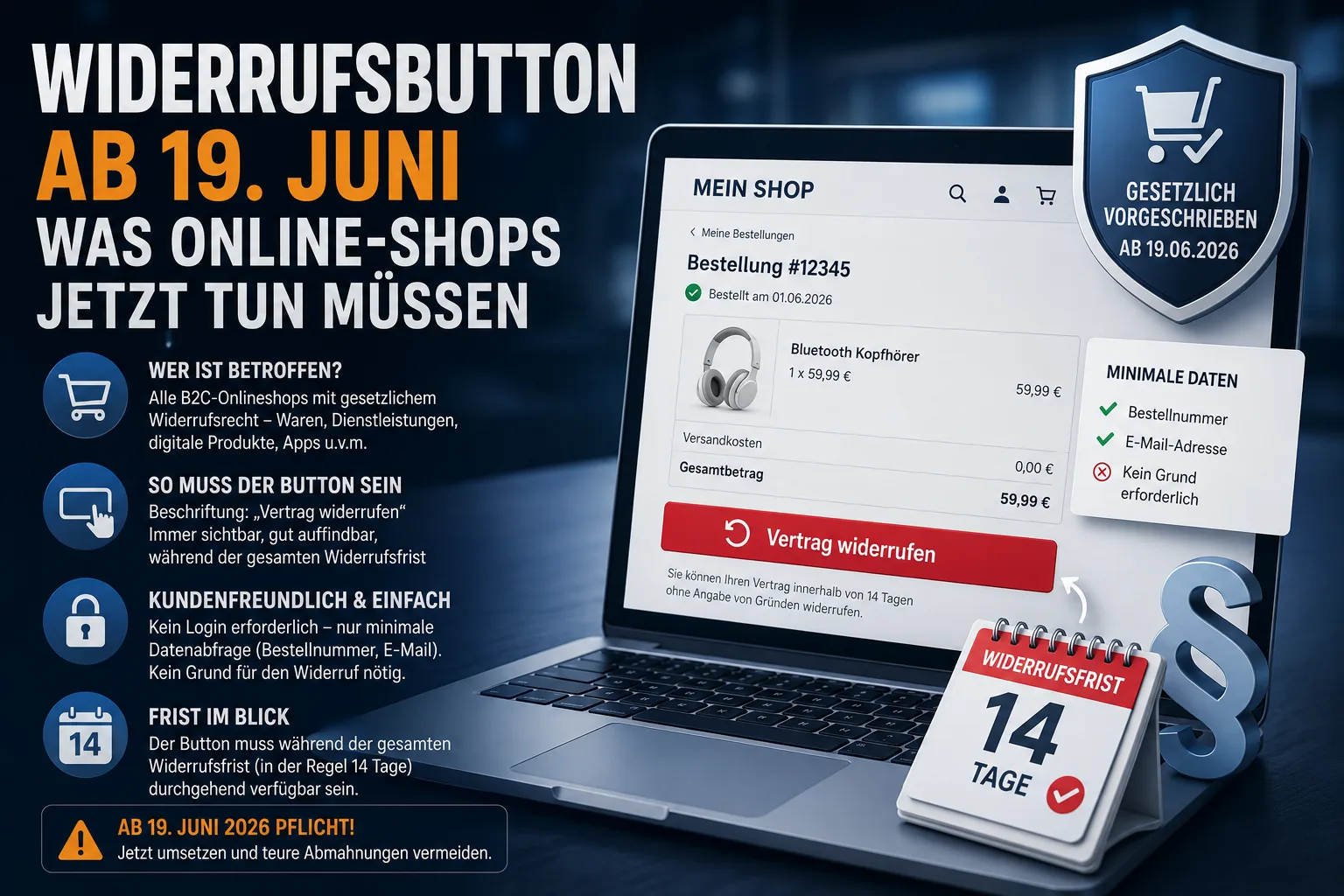
Since 19 June 2026, every German online shop selling to consumers has had to provide a so-called cancellation button. Anyone who fails to do so risks warning letters, fines and a withdrawal period extended to up to 12 months and 14 days. Here is how to meet the new duty under § 356a BGB safely.
Table of contents
- What is the cancellation button?
- Who is affected?
- How the button must look and work
- Confirmation page and receipt notice
- What happens in case of breach?
- Checklist: what to do by 19 June 2026
- Frequently asked questions
- Conclusion
What is the cancellation button?
The cancellation button is an electronic button in the online shop that lets consumers cancel a contract conveniently online — no letter, no phone call, no hunting around. The duty is set out in the new § 356a of the German Civil Code (BGB) and transposes EU Consumer Rights Directive 2023/2673 into German law. The implementing act was published in the Federal Law Gazette on 5 February 2026 and the rule takes effect on 19 June 2026 with no transition period.
Important: Classic cancellation by e-mail, contact form or letter remains valid in parallel. The button is an additional, simple option for your customers — and a new obligation for you.
Who is affected?
The duty applies to every business that concludes contracts in the B2C area (sales to private customers) via an online user interface. That includes:
- Own online shops for goods or digital products
- Booking pages for services such as coaching, photo shoots or courses
- Insurance and financial services portals
- Apps, where the contract is concluded via the app
The button is only required where a statutory right of withdrawal exists. Pure B2B shops are not affected.
Example: Sarah runs a small Shopify shop selling hand-bound notebooks and also sells online workshops through her website. Both offers target private customers — she needs a cancellation button for both by 19 June 2026.
Special case: marketplaces
If you sell exclusively via Etsy, Amazon, eBay, Otto or Kaufland, you cannot change the marketplace interface yourself. The technical implementation is the platform operator's job. Even so, you remain the contractual partner of your customers and must process incoming cancellations correctly. This is even more relevant if you also run your own shop — your own shop definitely needs the button. For tips on managing your marketplace listings, see our article on the new eBay rules for 2026.
How the button must look and work
The requirements are fairly concrete in both the act and its explanatory memorandum. The most important points:
- Labelling: "Cancel contract" or an equivalent unambiguous wording
- Findability: reachable from every page of the shop, clearly visible (contrast, colour, clear placement)
- Availability: continuously accessible throughout the withdrawal period (usually 14 days after delivery)
- No login required: the customer must not be forced to register or install an app. An exception applies only if the contract itself requires a customer account (e.g. a streaming subscription)
- Data minimisation: only data needed to identify the contract and to send the confirmation may be requested — typically the order number and e-mail address. The reason for cancellation must not be asked
What does this mean for you? A single button is enough if it can be reached from every page and is visually highlighted. In the footer it only suffices if it clearly stands out from the terms and conditions, legal notice and privacy policy; an inconspicuous footer link has already drawn a warning letter. Hiding it in the FAQ or behind a login wall is not allowed.
Confirmation page and receipt notice
After the first click a two-step process must follow: the customer initiates the cancellation, reviews the entries and actively confirms via a second button ("Confirm cancellation" or similar). Only then is the cancellation considered declared.
Immediately afterwards you must send a confirmation of receipt on a durable medium — in practice almost always an e-mail. This notice must contain at least:
- the content of the cancellation declaration
- date and time of receipt
The notice only documents receipt. It says nothing about the legal validity of the cancellation — you check that later as usual.
What happens in case of breach?
The new duty is open to warning letters. Law firms and trade associations expect that compliance will be easy to check and accordingly closely monitored.
The main risks if you fail to comply:
- Extended withdrawal period: instead of 14 days the customer can withdraw up to 12 months and 14 days — even if the goods have been used
- Warning letters by competitors or consumer protection associations (with lawyer's fees)
- Fines: up to 50,000 euros for small businesses, up to 4% of group-wide annual revenue for companies with more than 1.25 million euros in turnover
What does this mean for you? A forgotten implementation can be far more expensive than the few hours of work or the one-off investment in a shop plugin.
Checklist: what to do by 19 June 2026
A short checklist for shop operators:
- Clarify whether you are affected: do you sell to consumers via your own website or app? Then yes.
- Check your shop system: Shopware, WooCommerce, Shopify and others are working on official modules or updates. Ask your vendor or agency specifically.
- Place the button prominently: it must be reachable from every page and lead straight to the form, without unnecessary intermediate steps. In the footer it is only enough if it clearly stands out visually from the terms and conditions, legal notice and privacy policy.
- Set up the confirmation page: two-step, with mandatory fields for order number and e-mail.
- Prepare the confirmation e-mail: an automatic message containing the declaration and a timestamp.
- Update your withdrawal instructions: you must now also inform customers about the cancellation function and its placement. Have the texts reviewed.
- Train your team: anyone processing orders should know what a button cancellation looks like and how to log it. Clean processes also help with dunning — see our piece on dunning for self-employed professionals.
- Document all cancellations completely: date, order number, content. This protects you in a dispute and fits well with clean invoice management.
Frequently asked questions
Does the cancellation button also apply to my Etsy or Amazon account?
No, you cannot change the platform interface itself. The technical duty lies with the marketplace operator. As a merchant you remain the contractual partner of your customers and must process cancellations correctly. As soon as you also run your own shop, you need the button there.
Is a link to a contact form enough?
No. The cancellation button is a dedicated, standardised function with a two-step process and an automatic confirmation. A simple contact form does not meet the requirements.
Do I still have to accept cancellations by e-mail or letter?
Yes. The button supplements existing cancellation options, it does not replace them. Customers may still cancel by e-mail, letter or phone.
Does the duty also apply to B2B shops?
No. The duty applies only to contracts with consumers. Pure B2B shops are not affected. For mixed shops it is safer to install the button or to separate the areas cleanly.
What about service or coaching bookings?
These are also affected if they are concluded online with private customers. A photographer selling shoots through their own booking system, or a coach with an online calendar, also needs the button.
Conclusion
The cancellation button is not a recommendation but a hard duty from 19 June 2026 — and the penalties for missing it are noticeable. If you run your own online shop, speak with your shop system provider or agency now and finish the implementation by mid-June. Clean order and invoice processes also help you process incoming cancellations without panic — PepperTools features such as digital invoices and traceable document chains support you in doing so.
Try Easy Invoice free for 10 days — no payment details, the trial ends by itself.
Sources
- § 356a BGB enters into force on 19 June 2026 (Noerr) — legal analysis of the implementing act with references to the Federal Law Gazette
- Cancellation button from June 2026 (Verbraucherzentrale) — consumer perspective and official explanation of the legislative aim
- Cancellation button from June 2026 (IHK Hannover) — chamber of commerce information for businesses
- Cancellation button from June 2026 (IHK Regensburg) — chamber of commerce information with checklist
- Warnings related to cancellation button (Händlerbund) — overview of sanctions and fine levels
- Implementation of EU rules in consumer law (German Bundestag) — official information on the legislative procedure
- Withdrawal button: where it has to go (Händlerbund, German) — footer only with clear highlighting, no login
- Warning letter over an inadequate withdrawal button (IT-Recht Kanzlei, German) — case of the Wettbewerbszentrale, August 2026
Note: This article is not tax or legal advice. For your individual case please consult a tax adviser or lawyer.
Handle invoices more easily
Easy Invoice combines quotes, invoices and customer management in the cloud.
Try Easy InvoiceRead next
 Taxes & Law
Zusammenfassende Meldung (ZM): deadline, ELSTER and who must file
Anyone who supplies goods or invoices services without German VAT to business customers in other EU countries reports these sales to the German Federal Central Tax Office. Here you can find out who has to report, by when, what goes into the report and what happens if it is missing.
 Taxes & Law
USt-IdNr.: how to apply, how to check and when you need one
The USt-IdNr. (EU VAT ID) is a second number alongside the Steuernummer, meant for business with companies in other EU countries. You apply for it free of charge at the German Federal Central Tax Office and check your customer's number there too; here is how both work and how to find out whether you need one at all.
 Taxes & Law
Low-value assets in Germany (GWG) 2026: €800 limit, net or gross
The GWG limit in Germany is €800 net in 2026, also under the small business scheme. Which purchases you deduct at once, when the pooled item pays off and how to book it.