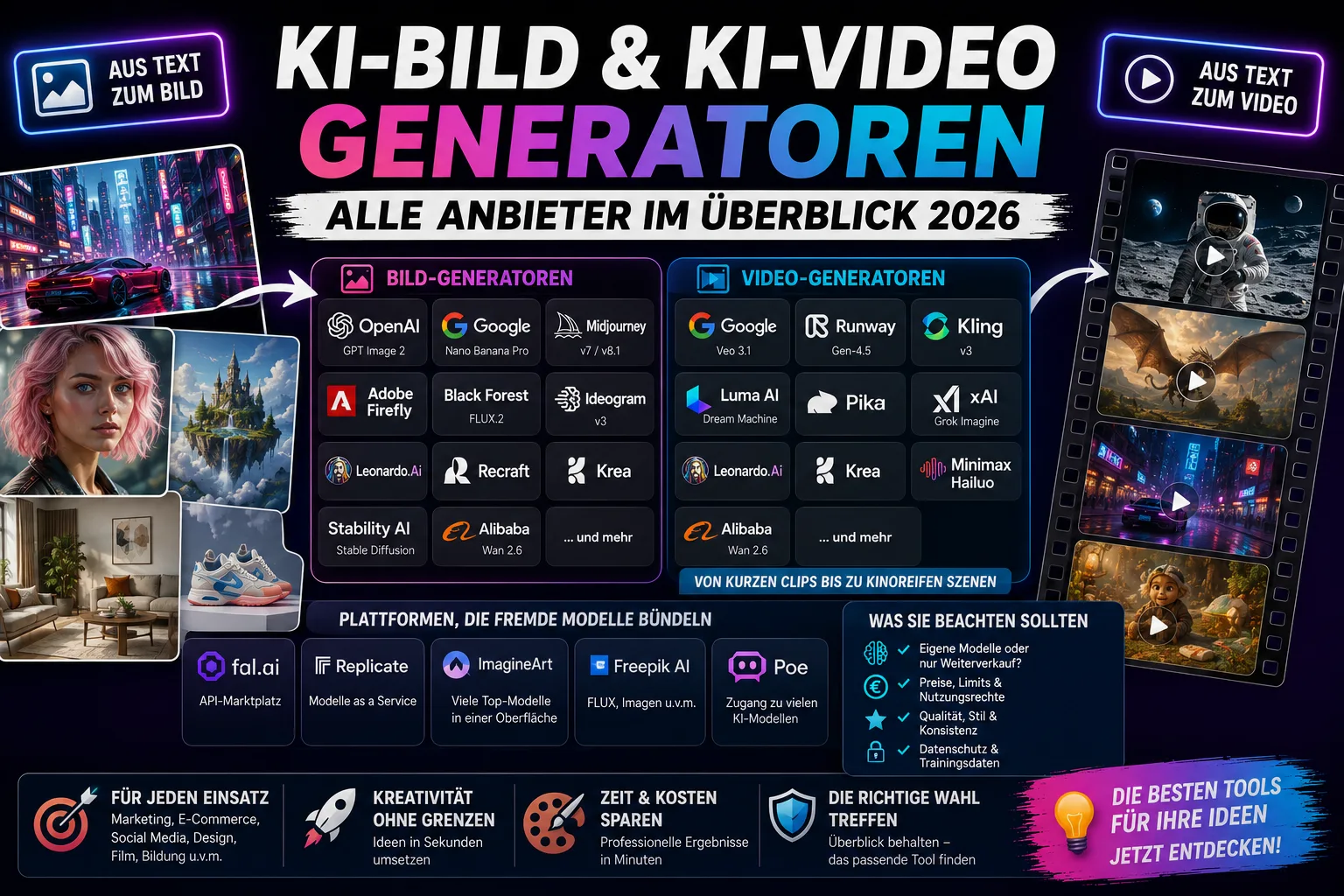
Anyone searching for an AI image generator right now runs into a problem fast: there isn't "the one" provider, but a dozen names that overlap and plug into each other. Common questions include: which tool is actually the best right now? What does an AI image generator really cost per month? Are there free alternatives that still deliver good results? And – especially with newer platforms – does the provider even run its own model, or is it actually generating images through someone else's interface?
Video generation adds another layer of uncertainty: the market moves fast, individual services get discontinued or renamed, and anyone reading a tutorial from a year ago is likely to land on a tool that no longer exists in that form. That's exactly why a sober stock-take is worth doing: which provider makes images, which makes videos, which does both – and who builds their offering on someone else's model instead of developing their own.
Contents of this article:
- All providers at a glance
- Which provider is strongest for what?
- How strictly do providers screen prompts?
- Web and app design with AI: more than just an image
- Self-hosting image and video generation instead of using the cloud
All providers at a glance
The following list is sorted by name recognition and market relevance, not alphabetically. At the top are the providers almost no one working with AI images or video can avoid; further down are specialized tools and pure aggregator platforms.
| Provider | Image | Video | Extra features (selection) | Price from |
|---|---|---|---|---|
| OpenAI (GPT Image 2, formerly Sora) | ✅ | ⚠️ discontinued | Editing/inpainting, reference images, API | API from approx. $0.03/image (1K) |
| Google DeepMind (Nano Banana Pro, Veo 3.1) | ✅ | ✅ | 4K image output, native audio track for video, reference images | Gemini app free with limits, Pro access from $19.99/month |
| Midjourney (v7 / v8.1) | ✅ | ❌ | Very high style consistency, 2K default resolution, no classic API (Discord/web only) | from $10/month |
| Adobe Firefly | ✅ | ✅ | Commercial legal indemnification (trained only on licensed material), integrated into Photoshop/Illustrator | Free with limits, Standard from $9.99/month |
| Black Forest Labs (FLUX.2) | ✅ | ❌ | Up to 4 megapixels, up to 10 reference images at once, API-first | API access mostly via third parties (see below) |
| Ideogram (v3) | ✅ | ❌ | Leading at readable text in images (logos, posters, packaging) | from $7/month |
| Runway (Gen-4.5) | ❌ | ✅ | Reference image and camera control, character consistency, built-in video editor | from $12/month |
| Kling (Kuaishou, v3) | ✅ | ✅ | Multilingual lip sync, multiple video scenes sharing one audio track | from $10/month |
| Stability AI (Stable Diffusion) | ✅ | ❌ | Open model weights, self-hostable, free when self-hosted | Free (self-hosted) |
| Leonardo.ai | ✅ | ✅ | Canvas for in-/outpainting, custom model training from 10–20 images, upscaling up to 8K | Free with limits, from $12/month |
| Luma AI (Dream Machine) | ❌ | ✅ | Fast, short clips with natural motion | from $30/month |
| Pika | ❌ | ✅ | Proprietary video effects (e.g. object swaps, lip sync) | from $8/month |
| Recraft | ✅ | ✅ (via an integrated third-party model) | Strong at vector graphics, icons, and mockups | Free with limits, Pro from $25/month |
| xAI (Grok Imagine) | ✅ | ✅ | Fast generation, geared more toward short social clips | Part of X Premium+ |
| Krea (Krea 2) | ✅ | ✅ | Own foundation model, also usable as a gateway to third-party models | — |
| Minimax/Hailuo | ✅ | ✅ | — | — |
| Alibaba (Wan 2.6) | ✅ | ✅ | Partially open model weights | — |
| fal.ai | ✅ | ✅ | Pure resale platform: third-party models (e.g. FLUX, Krea) billed by GPU-second | usage-based |
| Replicate | ✅ | ✅ | Catalog of third-party models, own models can be plugged in | usage-based |
| ImagineArt | ✅ | ✅ | Bundles e.g. FLUX.2, Nano Banana, GPT Image, Kling, Veo, Runway under one interface | own subscription, independent of the original prices |
| Freepik AI | ✅ | ❓ | Bundles FLUX Pro, Imagen, and other models; full API only on the Enterprise plan | included in Freepik subscription |
| Poe (Quora) | ✅ | ✅ | Over 200 models from various providers accessible under one subscription | from $19.99/month |
| Bing Image Creator (Microsoft) | ✅ | ❌ | Uses OpenAI models under the hood, completely free | Free |
Prices reflect the cheapest regular entry-level tiers of each provider at the time of research (July 2026). Almost all services also bill via credits or balances, so the actual price depends heavily on usage volume – the "from" figure refers to the lowest paid tier, not a flat rate for unlimited use.
Sora is no longer an active offering
Anyone coming across Sora from OpenAI in older comparisons or tutorials should know: the product is being wound down. The Sora app and web interface were already discontinued on April 26, 2026, and the associated programming interface (API) will follow on September 24, 2026. Users who had stored content there were asked to export it before the respective deadlines – once the deadlines pass, the data will be permanently deleted. OpenAI's own image model GPT Image 2 is unaffected by the shutdown and remains available.
Who's actually using whom? Proprietary models vs. bought-in technology
One thing that gets lost in many comparisons: not every provider with its own name and interface also has its own AI model behind it. A genuine model developer like OpenAI, Google, Black Forest Labs, Midjourney, Kuaishou (Kling), or Alibaba (Wan) trains the underlying AI itself and covers the compute costs for doing so. Platforms like fal.ai or Replicate, by contrast, are pure access points: they host third-party models and bill usage by compute time, without developing a base model of their own.
In between sits a third group, which includes ImagineArt, Freepik, or Poe. These services bundle several third-party models under one interface and one subscription price. That can be convenient if you want to try out different models without opening a separate account with every manufacturer – but the price is usually higher than what you'd pay the original provider directly, and you're dependent on that provider's availability and terms. Recraft's video feature is a concrete example of this: the image generation is built in-house, while the video generation runs on an integrated model from xAI.
Which provider is strongest for what?
There's no such thing as "the best AI image generator" – the answer depends on what the image or video is actually needed for. A model that excels at photorealistic product images doesn't necessarily do well with readable text in images, and a video tool for short social clips pursues a different goal than one built for a multi-second ad with sound. The following overview summarizes what individual providers are most frequently recommended for in current tests and comparisons:
| Use case | Frequently recommended providers | Reasoning |
|---|---|---|
| Photorealistic images | Google Nano Banana Pro, OpenAI GPT Image 2 | Currently considered leaders for natural-looking scenes and product photos |
| Text, logos, posters | Ideogram, GPT Image 2 | Noticeably more reliable text rendering in images than the market average |
| Artistic/painterly style | Midjourney | Known for atmospheric imagery reminiscent of concept art rather than pure realism |
| Vector graphics, icons, mockups | Recraft | Specialized in icons, flat design, and brand design rather than photorealism |
| Product photos with a real reference | Adobe Firefly, specialized reference models | Work with multiple reference images of the real product so shape and labeling are preserved |
| Cinematic ads with sound | Google Veo 3.1, Kling 3 | Native audio track, high resolution, built for longer brand spots |
| Short social media clips | Pika, xAI Grok Imagine | Built for fast, eye-catching short clips rather than long sequences |
| Video with camera/character control | Runway | Precise control over camera movement and recurring characters |
| Affordable video at solid quality | Kling (lower tiers) | Regularly named in comparisons as a budget-friendly alternative to pricier top models |
This categorization is based on current test reports and comparison sites, not on our own measurements – in such a fast-moving market, the ranking can shift within a few months.
How strictly do providers screen prompts?
One frustration that keeps coming up in user forums has nothing to do with creativity: rejected prompts. Even for everyday, completely legitimate requests – say, product photos for a catalog – some services flag a content policy violation without the user being able to tell which part of the description triggered it. The check often happens in a pre-screening filter stage before the actual image model even sees the request – which is why the resulting error messages tend to be unhelpful.
How strict this screening is varies noticeably between providers:
- Adobe Firefly is considered especially cautious. Since the model is trained exclusively on licensed Adobe Stock material and public-domain works, and Adobe offers a commercial legal indemnification, its content policies are correspondingly narrow – anyone who wants legal certainty in a business context gains that security, but loses creative latitude.
- Midjourney also relies on a multi-stage check combining keyword filters and an additional AI classifier; its community guidelines require content to be consistently safe for work.
- Leonardo.ai is described in current comparisons as noticeably looser than Midjourney or Adobe Firefly, particularly for artistic subject matter on paid tiers.
- Open models like FLUX and Stable Diffusion are no longer subject to any provider-side prompt screening when self-hosted, since there's no central platform standing in between. For commercial use, though, the specific license matters: while the faster FLUX.1 Schnell variant is freely usable commercially under Apache 2.0, the higher-quality FLUX.1 Dev variant requires a separate license from Black Forest Labs for commercial deployment.
A simple rule of thumb follows from this for everyday use: the more a provider leans on legal indemnification and brand reputation (Adobe, but also Midjourney through its community focus), the narrower its prompt screening tends to be. Anyone who repeatedly hits false-positive rejections on otherwise harmless subjects will more often find an alternative among open, self-hosted models or somewhat more permissive cloud providers like Leonardo.ai – but then has to check for themselves what's legally permissible, since liability shifts more toward the user.
Web and app design with AI: more than just an image
Alongside classic image generators, a separate category of tool has established itself – one that doesn't aim at individual images but at actually functioning web interfaces and app views built from real HTML, CSS, and JavaScript. Anyone searching for AI support for website or app design usually means exactly that: a draft they can view directly in the browser, not just a static image of a possible interface. The leading providers in this space differ significantly in how much they automate and how close the result is to finished code.
Claude Design (Anthropic)
Claude Design has been available as a research preview for Pro, Max, Team, and Enterprise plans since April 2026. During setup, Claude can optionally read the existing codebase, existing Figma files, the live website, or previous presentations, and derive a design system of colors, typography, and recurring components from them. That system is then automatically applied to every new draft, so landing pages, dashboards, or app views stay visually consistent instead of starting from scratch with every new prompt. Changes can be made via chat, inline comments on the draft, or sliders for spacing and color. Finished drafts can be exported as an HTML file, PDF, PowerPoint file, or directly as a handoff package to Claude Code, which then builds runnable code from it.
Strength: the ability to independently derive a coherent design system from an existing code repository, rather than just importing individual Figma files – something comparable tools reportedly can't do in this form according to current comparisons. Weakness: the tool does work for mobile screens, but is considered fairly general-purpose, without specialized tools for native app particulars. Its status as a research preview also matters – functionality and availability may still change.
Google Stitch
Stitch grew out of Galileo AI, which Google acquired in 2025, and now runs on Gemini 3. The tool offers an infinite canvas, can generate multiple screens simultaneously, can also be controlled by voice, and links individual screens into clickable, testable flows. Code export covers HTML, CSS, Tailwind CSS, Vue.js, Angular, Flutter, and SwiftUI. Stitch is free to use.
Strength: very broad export into different frontend and app frameworks (including Flutter and SwiftUI for native apps), plus the ability to connect multiple related screens directly into a testable click-through prototype – and all for free. Weakness: unlike Claude Design, Stitch doesn't automatically derive a design system from an existing code repository; it works in a more prompt- and canvas-driven way.
ChatGPT / OpenAI
OpenAI offers Canvas, a workspace for text and code projects that opens whenever ChatGPT generates longer content or code. For pure interface visuals, there are also offerings built on OpenAI's own image model GPT-Image-2 that derive interactive web, iOS, and Android interfaces from it. The underlying models in the GPT-5.4 series were specifically trained to produce more appealing, more production-ready frontends.
Strength: tight integration with the already widely used ChatGPT, plus strong image quality thanks to GPT-Image-2 as a foundation. Weakness: based on current comparisons, there's no equivalent to Claude Design's ability to extract production-ready design systems directly from a code repository and apply them consistently to new drafts.
v0 (Vercel) and Lovable
Both tools originally come more from the development side than the design side. v0 generates production-ready Next.js code, can be published directly to Vercel, and syncs with GitHub; screenshots or Figma designs can be uploaded as references. Lovable turns a plain-text description into a complete application including frontend, backend, database, and login functionality, and imports Figma drafts via a shared link.
Strength: both tools go beyond pure UI design and deliver directly runnable, often complete applications rather than just interface drafts. Weakness: both can import existing Figma designs, but neither derives an independent design system from an existing code repository – new drafts are less automatically aligned with an already established visual language.
Self-hosting image and video generation instead of using the cloud
Anyone who doesn't want to be tied to a cloud provider's subscription limits and prices for every single image or video can also run image and video models on their own hardware. Unlike classic chat LLMs, which can be started locally fairly easily with tools like Ollama, this requires a different software foundation.
What is ComfyUI?
ComfyUI is a free, open-source interface for locally run image and video models – the counterpart to a cloud interface like Midjourney's or Runway's, except the computation runs on your own graphics card instead of someone else's servers. Instead of a single input field, ComfyUI works with individual "nodes" that connect like a circuit diagram: one node loads the model, another accepts the prompt, another controls image size or sharpening. That allows very fine-grained control over every single step of generation, but it also means a noticeably steeper learning curve than a simple web interface with just one text field. ComfyUI has since become the de facto standard: virtually all open image and video models – including FLUX, Stable Diffusion, Wan, HunyuanVideo, and LTX-Video – ship with official or community-maintained integrations for it.
Connecting to Open WebUI
Open WebUI, the popular interface for self-hosted chat models, can be connected directly to ComfyUI for image generation – this is officially documented and not a workaround: ComfyUI runs as its own service, gets opened up for network access via a configuration flag, an exported workflow is imported into Open WebUI, and images can then be generated directly from the familiar chat window. For video generation, however, there's no comparable native integration with Open WebUI yet – there, operation runs directly through ComfyUI itself as a standalone interface.
Which models are suited for local use
The selection of models has broadened considerably in 2026:
- For images, FLUX.2 and Stable Diffusion 3.5 are the two central model families. The smaller FLUX.2 variant ("klein", 4B parameters) already runs on roughly 8 GB of VRAM, while the higher-quality FLUX.2 Dev variant needs around 32 GB. As a rough rule of thumb: 12 GB of VRAM is enough for SDXL or FLUX Schnell, and from 24 GB you can also run FLUX Dev and most video models.
- For video, Wan 2.2 (Alibaba), HunyuanVideo (Tencent), and LTX-Video (Lightricks) are the most widely used open models. Thanks to its Apache 2.0 license and comparatively moderate memory requirements (the dense TI2V-5B variant runs on a single 24 GB graphics card), Wan 2.2 is considered a good entry point for most people; HunyuanVideo tends to score higher on output quality, but in its current version 1.5 also needs only around 14 GB rather than the original 45 GB.
Is your own hardware worth it?
Whether your own hardware pays off financially depends heavily on how often you actually use it. A used RTX 3090 with 24 GB of memory is currently considered the best price-to-performance option for getting started (roughly $700–900 used), while an RTX 4090 is noticeably faster but also costs more and draws more power. If you only need an image or video occasionally, a cloud subscription is generally cheaper; only with regular, heavy usage does owning hardware pay off noticeably compared to rented compute. The real advantage of self-hosting therefore lies less in the price per image and more in full control over the model, the data, and prompt freedom, without being bound by a cloud provider's rules.
Related articles
- Claude Fable 5 is back – and free to try in your subscription
- Claude Fable 5 free until July 12 – is OpenAI's GPT-5.6 behind the extension?
- GPT-5.6 (Sol, Terra, Luna) is here: availability, pricing – and why it's still missing from your ChatGPT plan This guide appears on office1.cloud, where freelancers also handle invoices and bookkeeping.
Handle invoices more easily
Easy Invoice combines quotes, invoices and customer management in the cloud.
Try Easy InvoiceRead next
 AI & Tools
GPT-6 Astra is here: what it can do, what it costs — and whether it is already in your ChatGPT plan
Astra does not replace the GPT-5.6 line, it sits above it. What reaches the Plus plan, what the API costs and what the benchmarks really show.
 AI & Tools
GPT-5.6 (Sol, Terra, Luna) is here: availability, pricing – and why it's still missing from your ChatGPT plan
OpenAI has released GPT-5.6, split into Sol, Terra and Luna. Who can already use it, why it's still missing from many ChatGPT plans, and what the three models cost.
 AI & Tools
Claude Fable 5 free until July 12 – is OpenAI's GPT-5.6 behind the extension?
Anthropic extended free access to its strongest model, Claude Fable 5, until July 12 – exactly when OpenAI is rumored to launch GPT-5.6. A look at the timing.