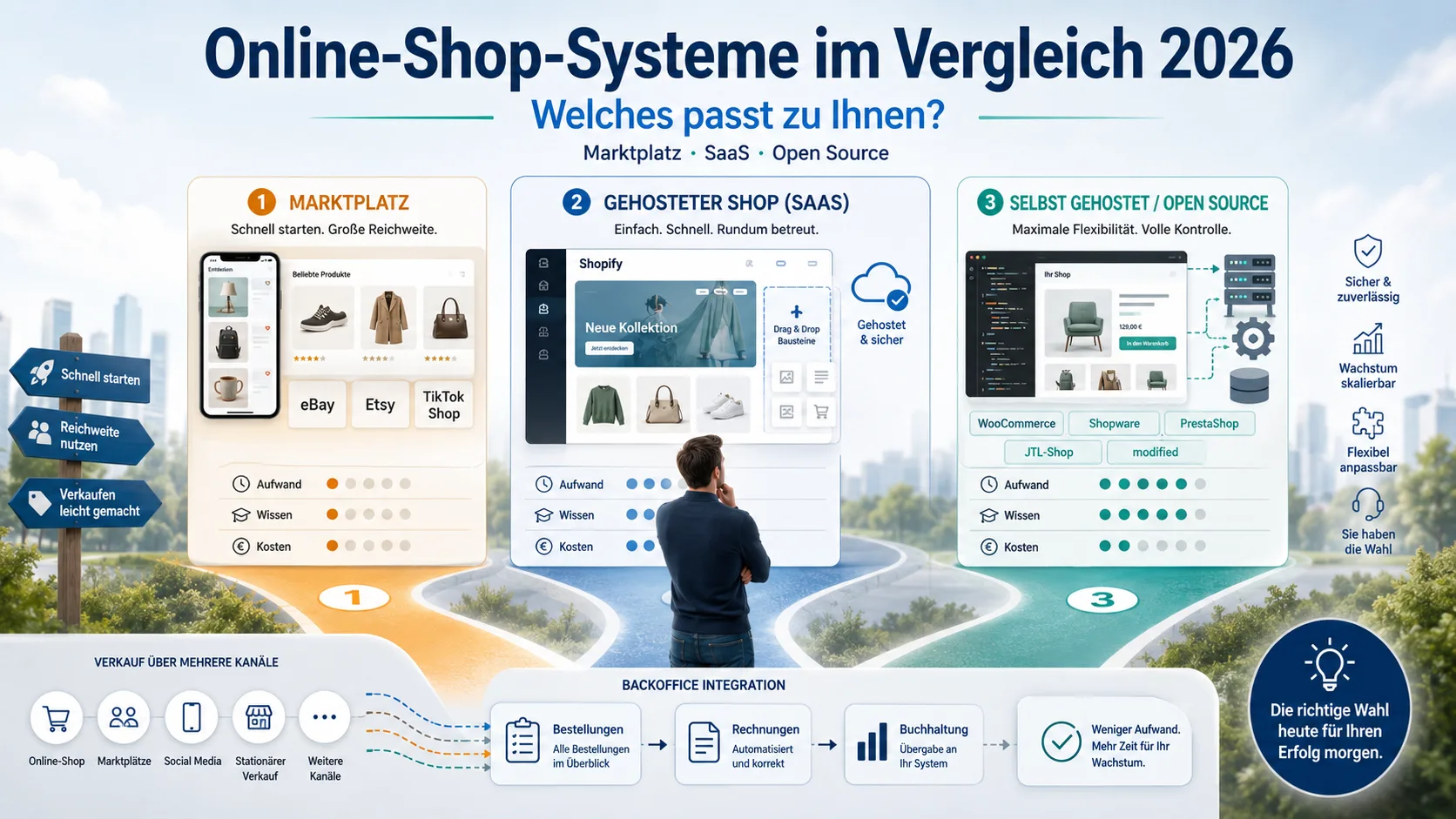
Online Store Systems Compared 2026: Which One Fits You?
You want to sell online, but the choice of store systems is overwhelming? This guide sorts the main routes – from marketplace to your own shop – by effort, required know-how and real costs. So you find the system that fits your business, not the one with the loudest advertising.
Table of contents
- The three ways to sell online
- Hosted store systems (SaaS)
- Self-hosted / open-source systems
- Marketplaces as a start or add-on
- Costs calculated honestly
- Which system for which type?
- The often forgotten part: what comes after the order
- Frequently asked questions
- Conclusion
- Sources
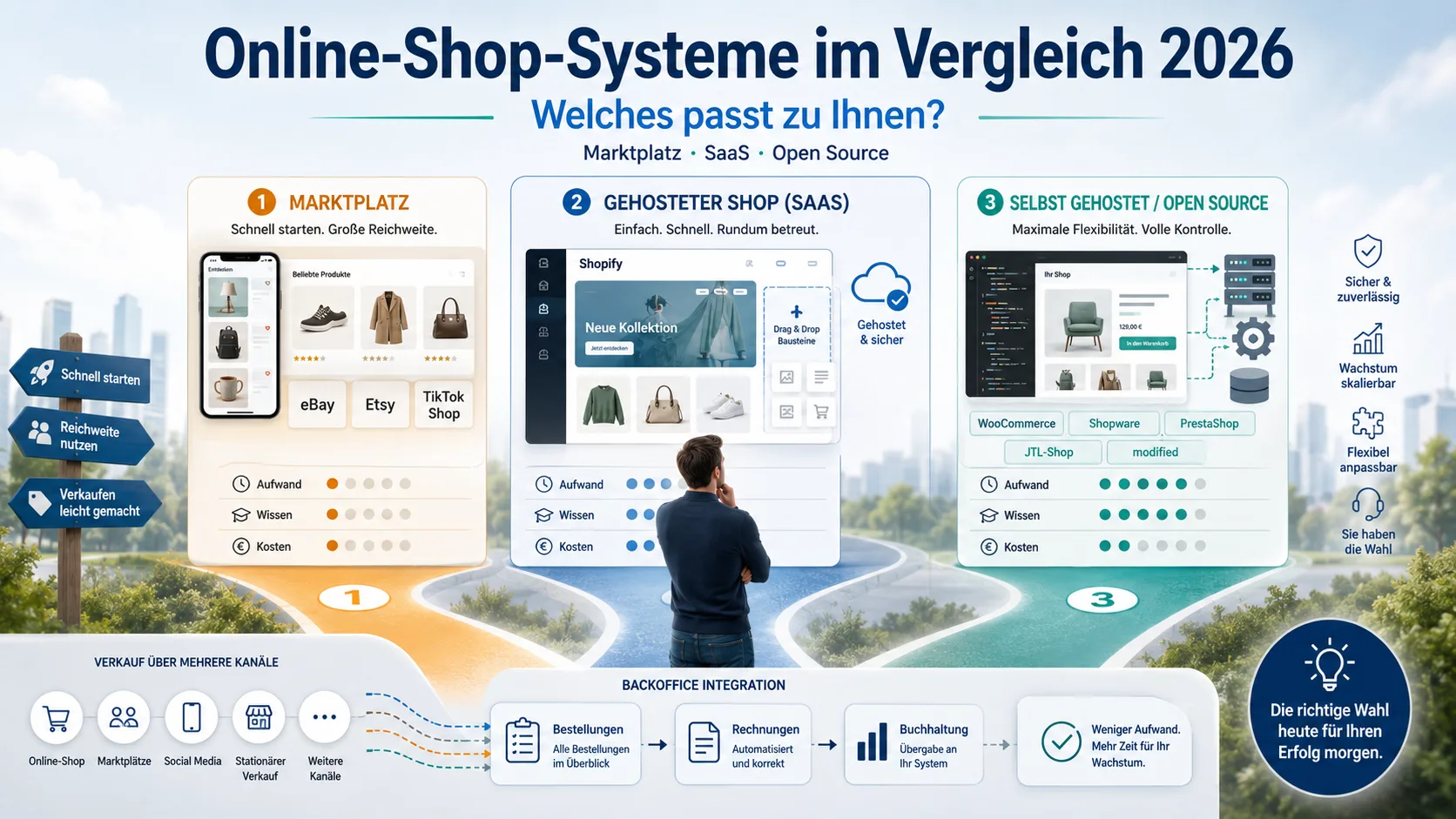
The three ways to sell online
Before you compare a single product, a simple framework helps. There are essentially three routes:
A) Sell via a marketplace – You list your products on eBay, Etsy or TikTok Shop and use their reach. You don’t need your own shop.
B) Rent your own shop from a provider (SaaS / hosted) – You book an all-in package like Shopify. Technology, servers and updates are handled by the provider. You focus on products and selling.
C) Run your own shop yourself (open source / self-hosted) – You install shop software such as WooCommerce, Shopware, PrestaShop, JTL-Shop or modified on your own web space. More freedom, but also more responsibility.
The decisive difference between B and C is the question: who handles the technology – the provider or you? Effort, costs and required know-how all hang on this one question.
What does this mean for you? Settle this basic question first. Everything else follows from it.
Two decisions follow the shop system right away: the carrier and the payment provider. Costs, delivery times and ratings of DHL, DPD, GLS, Hermes and UPS are in Shipping providers compared, and the transaction fees of PayPal, Stripe, Mollie and the shop systems' own solutions in Payment providers for online shops.
Hosted store systems (SaaS)
With a hosted system – the best known is Shopify – you rent your shop like an apartment: you move in and set up, but heating, roof and pipes are the landlord’s job. Updates, servers, security and availability lie with the provider.
Who it suits: Beginners and anyone who wants to start fast without dealing with technology.
Advantages: Quickly ready, no server maintenance, professional templates, predictable monthly costs.
Disadvantages: Ongoing monthly fee, limited customisation in detail, sometimes extra fees for extensions (“apps”) or for payments via third parties.
Required know-how: Low. If you can write an invoice and upload photos, you’ll manage.
Costs (approx., as of 2026 – please check current figures): Base plans start at around €25–35 per month. On top can come costs for a premium design, apps and – depending on the chosen payment provider – transaction fees.
Self-hosted / open-source systems
Here you usually get the shop software for free but run it on your own web space. This is more like a house you own: you design everything freely but are responsible for maintenance and repairs yourself. This group includes WooCommerce (a plugin for WordPress), Shopware, PrestaShop, JTL-Shop and modified eCommerce.
Who it suits: Advanced users, merchants with special requirements, or those working with someone who looks after the technology.
Advantages: Full control, freely extensible, no fixed licence fees with the open-source variants, your data stays with you.
Disadvantages: You (or a service provider) are responsible for hosting, updates and security. Without some basic technical understanding it quickly gets confusing.
Required know-how: Medium to high. WooCommerce is manageable with WordPress knowledge; Shopware, PrestaShop or JTL offer more depth but also require more learning.
Costs (approx., as of 2026): Software often €0, but: hosting approx. €5–30 per month, domain, SSL certificate, plus possibly paid themes, plugins and – if you don’t do it yourself – setup and maintenance by a service provider. The “free” software is therefore rarely truly free.
A practical note: JTL-Shop plays to its strengths above all together with its accompanying inventory management – interesting if you manage larger order volumes and stock.
Marketplaces as a start or add-on
If you want to start without your own shop or add extra reach, marketplaces are the fastest route. On eBay, Etsy and TikTok Shop you sell to an existing audience.
Who it suits: Beginners, part-timers and anyone who wants to test a product on the market before investing in their own shop.
Advantages: Immediate reach, no own shop needed, low entry barrier.
Disadvantages: Sales commission per order, strong competition, little brand loyalty and dependence on the platform’s rules.
Costs: Instead of a monthly rent you pay per sale. Etsy, for example, charges a listing fee per item plus a transaction fee, TikTok Shop raised its commission in Germany to 9 percent on 8 January 2026, and on eBay the fee depends on category and conditions.
Many successful merchants combine both: a marketplace for reach, their own shop for brand and margin. More on this in our articles on Otto Market and TikTok Shop 2026.
What does this mean for you? A marketplace is ideal for testing and a fast start – your own shop pays off as soon as you want to build a brand.
Costs calculated honestly
The advertised monthly price is rarely the real price. Especially with self-hosted shops, items come on top that appear on no advertising banner. Let’s work it through at three typical sizes. All figures are example values (as of 2026) and can vary considerably depending on provider, region and hourly rate.
Example A: The beginner (self-hosted, small)
A photographer sells prints on the side via a WooCommerce shop on simple web space.
| Item | Example cost / month |
|---|---|
| Web space (shared hosting) | €5–15 |
| Domain (e.g. €15–20/year) | ~€1.50 |
| SSL certificate (often included) | €0 |
| Updates/maintenance done yourself | €0 – but your time |
| Total (money) | approx. €7–17 |
Sounds cheap – and it is, as long as you install updates yourself and feel confident doing so. The “hidden” price here is your working time.
Example B: The growing shop (self-hosted, medium)
A merchant runs a Shopware or PrestaShop shop on their own (v)server and has a service provider install updates.
| Item | Example cost / month |
|---|---|
| Managed server / vServer | €20–60 |
| Domain & extended SSL | ~€5 |
| Paid plugins/themes (amortised) | €10–30 |
| IT administrator: regular updates, e.g. 2 hrs/month × ~€90/hr | ~€180 |
| Total | approx. €215–275 |
The biggest item here is not the technology but the person who maintains it. A self-hosted shop is never “finished”: the shop core, plugins and server need ongoing security updates. Whoever neglects them risks a hijacked shop account or a data leak – exactly the scenarios we describe in our article on cyber security for the self-employed.
Example C: The high-revenue shop (self-hosted, large)
Many items, high load, an in-house agency for operation and monitoring.
| Item | Example cost / month |
|---|---|
| Dedicated server / cloud infrastructure | €80–250 |
| Licences (e.g. commercial shop edition) | variable |
| Agency/administrator (maintenance, updates, monitoring), e.g. 4–8 hrs/month × ~€100/hr | €400–800 |
| Total | from approx. €500 |
What does this mean for you? With a hosted system (SaaS), updates, servers and security are included in the monthly price – you pay a higher “visible” fee but barely any hidden costs. With a self-hosted system the software is cheap but ongoing operation is expensive – above all through regular update maintenance. So never count only the licence, but always hosting + updates + your time together.
Which system for which type?
Three typical profiles for orientation:
The part-time Etsy seller: Few, individual products, small budget, no interest in technology. → Marketplace (Etsy), perhaps later a simple hosted shop.
The painting business that wants to sell accessories: Wants to offer paints and tools on the side, without an IT department. → A hosted system (SaaS) or WooCommerce if a WordPress site already exists.
The growing online merchant: Hundreds of items, own brand, warehouse. → A self-hosted system like Shopware or JTL, often with a service provider and connected inventory management.
The often forgotten part: what comes after the order
Whatever store system you choose – with the “buy” click your office work only begins. For every order there’s an invoice, the assignment of VAT, an orderly filing and, at year-end, reports for the tax office and your tax advisor. Many merchants type all this by hand – from several shops into several lists. That costs time and is error-prone.
Here, office software that connects directly to your sales channels can help. Easy Invoice in the Office1 Cloud can connect with the systems from this article – the own shops Shopware 6, Shopify, WooCommerce, JTL-Shop, PrestaShop and modified eCommerce as well as the marketplaces eBay, Etsy and TikTok Shop. This keeps your back office largely independent of which store system you use today or switch to later.
Features that are often helpful in day-to-day online retail:
Turning orders into documents. Paid orders can be imported from the shop; you check the items and can create an invoice or delivery note from them – instead of typing in every order.
Support with VAT. The software can support you in assigning the right VAT case per item – for example domestic, intra-community supply with a VAT ID, export to a third country or small-business status under § 19 UStG. Such suggestions do not replace a tax review; responsibility for correct taxation remains with you or your tax advisor.
Formats for e-invoicing. Invoices can be generated in the XRechnung and ZUGFeRD formats, which are oriented to the European standard EN 16931. Under current law the obligation to receive has applied since 2025, and the obligation to send is planned in stages from 2027 – more on this in our article on the e-invoicing obligation 2027/2028.
Traceable document flow. Quote → order → delivery note → invoice, with a credit note or cancellation if needed. The documents stay linked, and already sent documents can be locked against accidental changes. This can support orderly, traceable document keeping.
Reports for an overview. Prepared reports such as the cash-basis profit calculation (EÜR), VAT-return preparation, business analysis (BWA), open items and customer revenues can help you keep an eye on turnover, expected tax burden and outstanding payments – and make coordination with your tax advisor easier.
Cash flow in view. An integrated dunning process and a PayPal account import can help you spot open amounts earlier and follow up.
Cloud, multilingual, hosted in Germany. Access via PC, Mac, tablet or phone; interface and documents in 9 languages; operation in Germany with an eye on data protection and with regular backups.
What does this mean for you? Choose your store system by reach and sales – and clarify early how order, invoice, tax and bookkeeping work together. Connected office software can make this part easier and keep your back office largely independent of the shop.
Frequently asked questions
What is the difference between a hosted and a self-hosted shop?
With a hosted shop (SaaS) the provider handles technology and servers, and you pay a monthly fee. With a self-hosted shop you run the software yourself and are responsible for maintenance and security.
Which store system is suitable for beginners?
For starting without technical knowledge, marketplaces or hosted systems are the easiest. Self-hosted open-source systems offer more freedom but require more learning or a service provider.
Are open-source shops really free?
The software is often free, but hosting, domain, any plugins and maintenance cause ongoing costs. “Free” refers only to the licence, not to operation.
Can I combine a marketplace and my own shop?
Yes, and many do. The marketplace brings reach, your own shop strengthens your brand and margin. The important thing is that orders from all channels come together centrally in your invoicing and bookkeeping.
Do I have to switch store systems later as I grow?
Not necessarily. Many start on a marketplace or a hosted shop and switch only when requirements rise. Office and invoicing software that is independent of the shop makes a later switch easier, because your back office stays the same.
Conclusion
There is no single best store system – there is the right one for your situation. Decide along three questions: marketplace or your own shop? How much technology do I trust myself with? What does it really cost? And keep an eye on the part almost everyone underestimates: invoices, tax and bookkeeping. Office software that can connect your shops keeps your back free – so you can focus on selling.
Sources
- Office1 Cloud / Easy Invoice – supported shop connections and features — Overview of the connected store systems and marketplaces as well as the features (order import, document flow, reports, e-invoicing).
Note: This article does not constitute tax or legal advice. The prices and fees mentioned are example values and can vary depending on provider and individual case. For your individual situation, please consult a tax advisor or lawyer.
Handle invoices more easily
Easy Invoice combines quotes, invoices and customer management in the cloud.
Try Easy InvoiceRead next
 E-Commerce & Marketplaces
New eBay Terms of Service from 15 September 2026: What Sellers Should Check Now
New eBay terms apply from 15 September. Four things change, and one of them can cost you your account.
 E-Commerce & Marketplaces
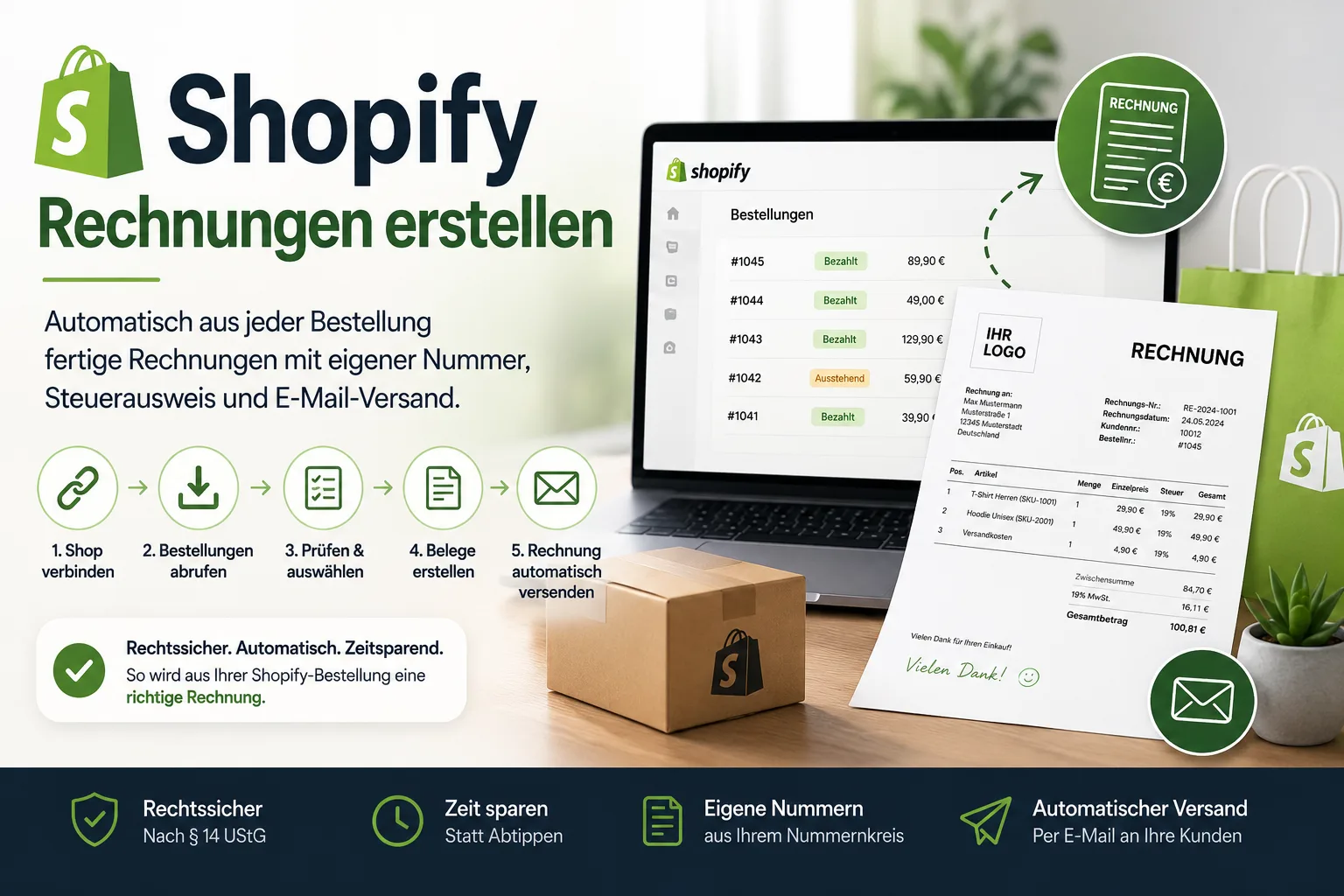
Creating invoices for Shopify
Shopify sends order confirmations – not invoices. How to get from a Shopify order to a finished invoice in five steps, with your own number, correct tax details and automatic sending.
 E-Commerce & Marketplaces
eBay vehicle parts: free returns mandatory since 28 September – what it costs you
New parts over 10 euros at a fixed price: since 28 September you have to take them back free of charge for 30 days and adjust your withdrawal policy. Which returns are not covered, what the rule costs and what to check now.