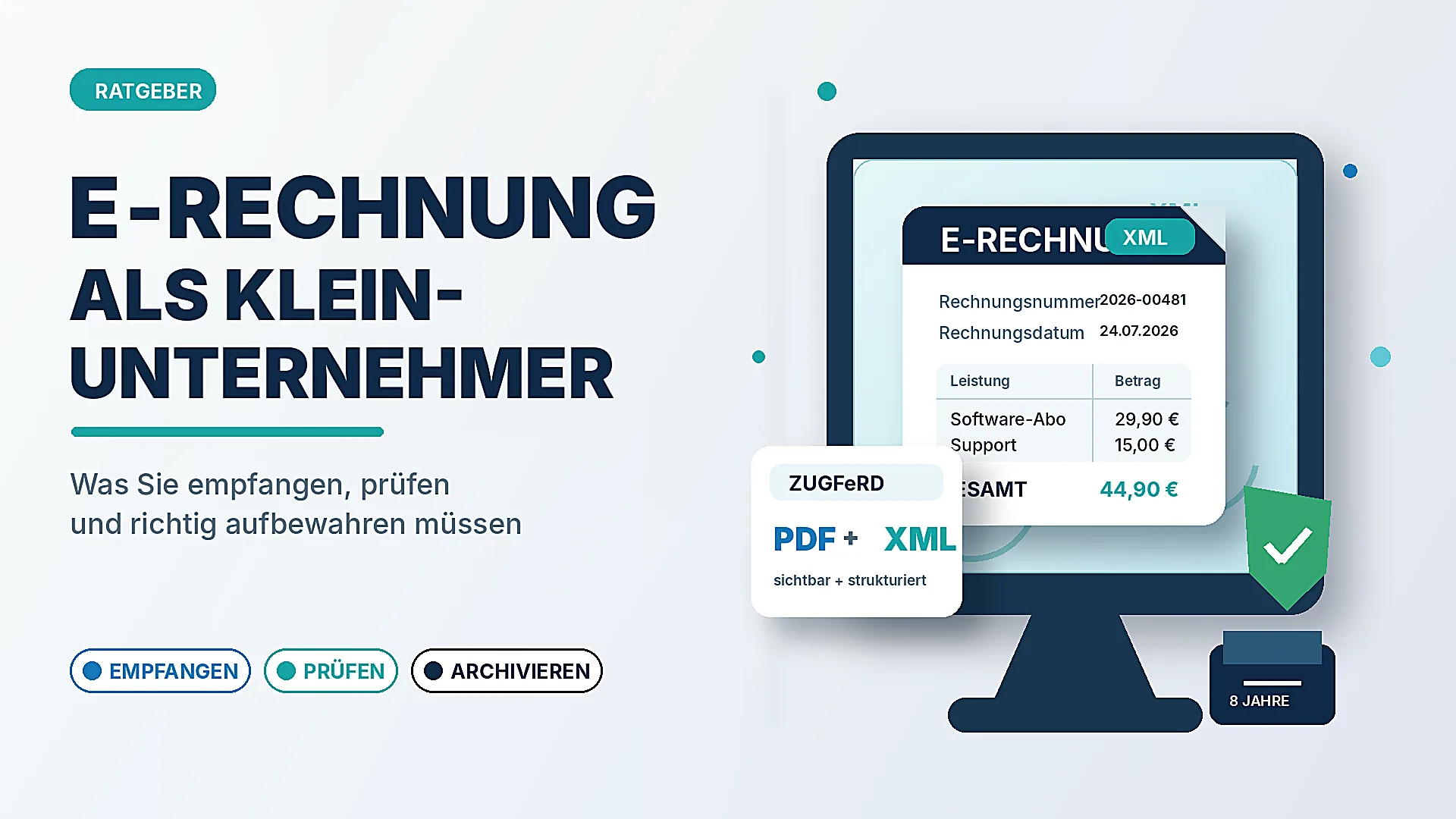
"I'm a small business, e-invoicing doesn't affect me" – that's the sentence that comes up most often in forums and tax groups right now. And it's only half true. What's correct: as a small business, you generally do not have to issue an e-invoice. What's wrong is the conclusion that you therefore don't have to do anything at all.
Because one thing has applied since 1 January 2025 to practically every business in Germany – including small businesses under § 19 UStG: you must be able to receive and store e-invoices from your business partners. This article answers the questions that actually come up in practice: How do I even recognise an e-invoice? Is my email inbox enough? What do I do with this XML file? Can I just print it and file it away? And what actually happens if I do something wrong?
A note up front: this article provides general information and is no substitute for tax or legal advice. When in doubt and in special cases, ask your tax office or your tax advisor.
Table of Contents
- The short answer
- "I don't issue e-invoices – do I still have to do anything?"
- How do I even recognise that an invoice is an e-invoice?
- Are really all receipts affected – even the €12 receipt?
- What does "able to receive" mean? Is my email inbox enough?
- I received an XML file – how do I open it?
- Is it enough to print the invoice and file it away?
- How do I store an e-invoice correctly?
- What happens if I do it wrong?
- How long will I still receive normal PDF invoices?
- Do I have to issue e-invoices myself as a small business?
- XRechnung or ZUGFeRD – what's the difference?
- Open and check e-invoices for free
- Checklist: e-invoices under control as a small business
The short answer
- Receiving: yes. Since 1.1.2025, every business – including small businesses – must be able to accept and store e-invoices. A normal email inbox is enough for that.
- Issuing: generally no. Small businesses are permanently exempt from the obligation to send structured e-invoices. You may continue to write paper or PDF invoices.
- Storing: the original counts. With an e-invoice, the XML file is the original. Filing away only the printout or a PDF generated from it does not satisfy the storage rules (GoBD).
- The PDF grace period is running out. A classic PDF invoice is, for VAT purposes, no longer an e-invoice. During a transitional period you may still receive such PDFs – but only with consent and only for a limited time.
The details – and above all the pitfalls – follow now.
Easy Invoice creates and receives XRechnung and ZUGFeRD e-invoices in every plan, see plans and prices.
"I don't issue e-invoices – do I still have to do anything?"
This is where the misunderstanding lies that currently triggers most questions. The e-invoicing obligation has two sides that have to be kept cleanly apart:
- Issuing (sending): Anyone who writes invoices in the B2B sector must gradually issue them as e-invoices – from 2027 for larger businesses, from 2028 in principle for everyone. Small businesses are exempt from this and may continue to send paper or PDF.
- Receiving: This obligation has applied since 1 January 2025 and without exception for small businesses. As soon as a business partner sends you an e-invoice, you must be able to accept it and archive it in its original form.
Put differently: you don't decide yourself whether you deal with e-invoices. That's decided by whoever sends you the invoice. And many suppliers, tool wholesalers, software providers or marketplaces have long since switched to XRechnung or ZUGFeRD. As soon as the first such file lands in your inbox, you're under obligation – regardless of the fact that you yourself only write small-amount invoices on paper.
How do I even recognise that an invoice is an e-invoice?
Before you can handle an e-invoice correctly, you first have to recognise it as such – and this is exactly where most people stumble. There are two cases, and one of them is tricky:
- The XRechnung is easy to recognise: the attachment contains a file with the extension
.xml. A double-click shows no pretty invoice, but code. At the latest by then you know: this is an e-invoice. - The ZUGFeRD invoice is the trap: it looks like a perfectly normal PDF invoice and can be opened as one. What's special is hidden inside it – an embedded XML file with the same data. From the outside you often cannot tell that a PDF contains it.
For you as a layperson, this means in practice: you can't always say for sure with the naked eye whether a PDF is "just a PDF" or a ZUGFeRD e-invoice. Two simple clues help:
- Watch for a note in the PDF. Many ZUGFeRD invoices contain the label "ZUGFeRD", "Factur-X" or "contains structured invoice data" somewhere. That's a clear signal.
- When in doubt, have it checked quickly. Simply drag the PDF into an e-invoice viewer (see below). If it detects data inside, it's an e-invoice – and you must keep the file in its original form.
When in doubt, the simple rule of thumb applies: keep the file, don't delete it. Anyone who keeps the original file does nothing wrong – even if it later turns out it was "only" a PDF.
Are really all receipts affected – even the €12 receipt?
No – and that takes a lot of the fear out of the topic for small businesses. Not every receipt has to arrive as an e-invoice. Permanently exempt are, among others:
- Small-amount invoices up to €250 gross (§ 33 UStDV) – these may still be issued as paper or simple PDF invoices. That covers a large part of the typical small receipts: office supplies, fuel, small material purchases.
- Travel tickets for passenger transport (§ 34 UStDV) – rail, bus or local transport tickets do not count as classic invoices, regardless of the amount.
For your everyday work this means: a noticeable portion of your incoming receipts may still arrive with you perfectly normally on paper or as a PDF. The e-invoice in the strict sense mainly concerns larger invoices from business partners who have already switched themselves.
What does "able to receive" mean? Is my email inbox enough?
Yes. For pure receipt, in the view of the tax authorities a perfectly normal email inbox is enough. You need no special portal and no expensive software just to accept e-invoices. It's sufficient that your business partner can send you the file by email and that it arrives with you.
The distinction is important: "able to receive" doesn't only mean that the email technically arrives. It also means that you can subsequently read and store in its original form the file it contains. That's exactly where things go wrong in practice – not at receipt, but at the two steps after: opening and archiving.
Practical tip from many forum questions: it's best to set up a fixed place where e-invoices land and stay – such as a dedicated email address (e.g. invoice@your-domain) or a clear filing folder. That way no XML file gets lost between newsletters and offers.
I received an XML file – how do I open it?
This is the question most frequently asked as soon as the first e-invoice arrives: the attachment contains a file with the extension .xml, and a double-click opens either the browser or a text editor with hundreds of lines of code. The invoice amount, due date and sender are somewhere deep in this structure – not readable like that.
The reason: an XRechnung is a pure data format. It's made so that accounting programs can read it in automatically – not so that a human reads it on screen. With a ZUGFeRD invoice you have it a bit easier: it's a PDF file that displays the invoice visibly and additionally has the XML data embedded invisibly. You can open that normally – just don't throw it away, because the embedded data are part of the original.
To make a pure XML invoice readable, you need what's called a viewer – a tool that translates the file into a clear, human-readable invoice. We present such a free tool further down (go to the section).
Is it enough to print the invoice and file it away?
No – and this is one of the costliest misconceptions. With an e-invoice, the structured XML file is the original. If you only open this file, print it and file away the paper printout, but then delete the XML file, you have destroyed the original. That doesn't satisfy the principles of proper bookkeeping (GoBD).
The printout is perfectly fine as an additional reading aid. But it doesn't replace the obligation to keep the original file unchanged. For an audit by the tax office, the structured data record counts, not the sheet of paper.
The same applies accordingly if you run an XRechnung through a viewer and generate a nice PDF from it: you may keep the PDF – but you must also secure the original XML file.
How do I store an e-invoice correctly?
Three points are decisive, and none of them requires an expensive special solution:
- Secure the original in its original format. The XML file (or the ZUGFeRD PDF with its embedded data) must be preserved unchanged. Don't "re-save" it into another format that loses the structured data.
- File it unchangeably – and not just in the inbox. This is the most common thinking error: receiving the e-invoice by email is permitted, but simply leaving it in the inbox afterwards is generally not sufficient as storage. A normal email inbox usually doesn't count as unchangeable (audit-proof) filing – emails can be moved, changed or deleted. You should therefore file the file away out of the email in a secure place where it cannot be changed unnoticed afterwards and remains findable at any time.
- Observe the retention period. For invoices, a period of eight years has generally applied since 2025 (previously ten). The e-invoice must remain readable and available in its original form over this period.
Anyone who works with invoicing or accounting software anyway has it easier here: such programs usually file incoming e-invoices away audit-proof automatically. But that's not strictly necessary for pure receipt – what's decisive is that the original is properly secured and not merely left in the inbox.
What happens if I do it wrong?
This is the question many google at night – and the honest answer is reassuring, without playing the topic down.
First: for you as a small business, less is at stake than for other firms. The biggest risk of an incorrectly handled incoming invoice is, for normal businesses, the lost input VAT deduction – and as a small business you don't have that anyway. So this worry doesn't concern you.
What remains is the formal obligation to store correctly. Anyone who doesn't keep receipts properly and in their original form risks objections during a tax audit – in the worst case, the tax office can rate records as improper and estimate turnover. That's the reason the original counts and not the printout. But an automatic fine solely for the fact that you filed a single XML file "only as a PDF" is not the normal case – what's decisive is that your filing overall is comprehensible and complete.
And one more reassurance on a common question: you do not have to confirm anything to the sender of an e-invoice and don't have to actively "agree" in order to be allowed to receive it. You accept the file like any other invoice – the difference lies only in opening and storing.
In short: no reason to panic, but a good reason to set up the handling cleanly once, before the files pile up.
How long will I still receive normal PDF invoices?
This too causes uncertainty, because two things get mixed up. The distinction is important:
- A simple PDF invoice has, for VAT purposes, no longer counted as an e-invoice since 2025, but as an "other invoice".
- Whether a business partner may still send you such a PDF depends on transitional rules: in the initial phase this is still permitted – but in principle only with your consent and for a limited time. From 2027 this narrows further, from 2028 the e-invoice is in principle the standard in B2B.
For you as recipient this means in practice: don't rely on receiving PDFs permanently. The share of genuine e-invoices in your inbox will rise over the next two years – which is why it's worth setting up how you handle them cleanly now, instead of panicking at the first XML attachment.
Do I have to issue e-invoices myself as a small business?
Generally no. Small businesses under § 19 UStG are permanently exempt from the obligation to create structured e-invoices. You may continue to issue your customers invoices on paper or as a PDF.
Two things you should nevertheless keep in mind:
- If your customer demands an e-invoice, depending on the situation it can make sense to accommodate them – for example if you supply larger firms or public clients who internally only process e-invoices any more. "Don't have to" doesn't mean "don't have to be able to".
- Issuing voluntarily is permitted. If you want to send XRechnung or ZUGFeRD yourself, you need software for that which creates the format. How the two formats differ and when which one fits, you can read in our article XRechnung or ZUGFeRD – the difference explained simply.
Whether and from when which obligations apply for which business size, we've also summarised in E-invoicing obligation for small businesses.
XRechnung or ZUGFeRD – what's the difference?
Briefly and without jargon, because both terms keep coming up when receiving:
- XRechnung is a pure XML format – only structured data, unreadable to the human eye without a viewer. It's demanded above all in dealings with public authorities.
- ZUGFeRD (and the nearly identical French Factur-X) is a hybrid: a visible PDF invoice into which the same data are additionally embedded as XML. You can view it perfectly normally, while the accounting program reads the data in parallel.
For storage the same applies in both cases: the structured data are part of the original and must be preserved.
Open and check e-invoices for free
For exactly the most common problem – "I received an XML invoice and can't read it" – we've provided a free e-invoice viewer. You can reach it without registration at www.office1.cloud/en/e-rechnung-viewer.
Here's how it works:
- Upload a file – by drag-and-drop or a selection button. The viewer automatically detects whether it's an XRechnung (XML) or a ZUGFeRD/Factur-X invoice (PDF with embedded data).
- All invoice data readable – issuer, recipient, invoice number and date, line items, totals, VAT and payment data are presented clearly, instead of as XML code.
- Structure and schema check – the viewer checks whether the file technically conforms to the official structure (the official XML schema). This is a format and structure check, not an official standard validation of all business rules – so it doesn't replace the substantive review of your bookkeeping.
- No data risk – your invoice is processed exclusively in working memory and in doing so is not stored and not logged. No login is needed, and the tool is free.
With it you can quickly open a received e-invoice, check what's in it, and generate the printout as a reading aid – you additionally keep the original XML file as described above.
Checklist: e-invoices under control as a small business
- Ensure receipt – a reachable email inbox is enough; ideally a fixed address or a fixed folder for invoices.
- Recognise the e-invoice – an
.xmlattachment is unambiguous; a PDF can be a ZUGFeRD invoice without you seeing it. When in doubt: keep the file, don't delete it. - Small amounts are relaxed – receipts up to €250 and travel tickets may still be paper/PDF.
- Make XML readable – use a viewer to open it, instead of searching the file for numbers.
- Never delete the original – the XML file (or ZUGFeRD PDF) is the original and stays preserved unchanged.
- The printout is only a reading aid – it doesn't replace storing the original.
- Don't leave it only in the inbox – file the file away in an orderly, unchangeable way, keeping it readable for around eight years.
- Don't rely on PDFs – the transitional period for simple PDF invoices is running out; the share of genuine e-invoices is rising.
- Issuing yourself stays voluntary – as a small business you may continue to write paper or PDF; you only have to be able to receive and store. If a public customer asks for one anyway: creating an XRechnung.
Handle invoices more easily
Easy Invoice combines quotes, invoices and customer management in the cloud.
Try Easy InvoiceRead next
 Invoicing & Accounting
Invoicing with a Kleingewerbe in Germany: sample, template, details
With a Kleingewerbe (small trade business), you write invoices like any other business. Whether VAT is added does not depend on the trade, but on the small business scheme (Kleinunternehmerregelung). Here you find the mandatory details for both cases and a sample to copy.
 Invoicing & Accounting
Showing a discount on an invoice in Germany: template, VAT, example
A discount is deducted from the net amount, and VAT is calculated afterwards. Here are two templates to copy, the rules for discount codes and vouchers, and what applies if you grant the reduction only after the invoice.
 Invoicing & Accounting
Freelancer invoices in Germany: template, required details, VAT
As a freelancer (Freiberufler) in Germany, you write invoices without registering a trade, but with the same mandatory details as any business. One question decides: do you add VAT or not? Here you find the answer for your case and a template for each of the three cases.