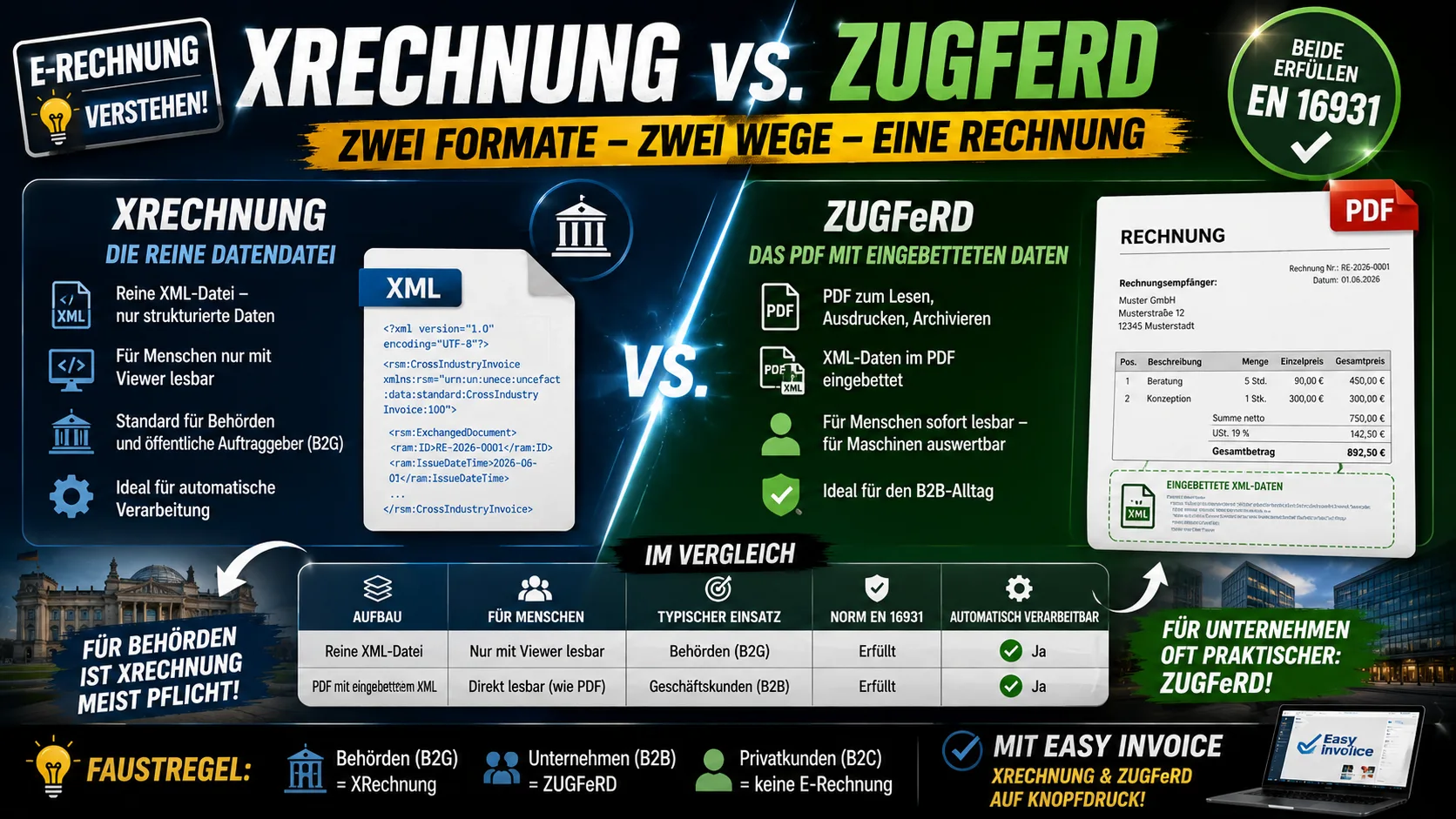
As soon as the e-invoice becomes a topic, two names come up: XRechnung and ZUGFeRD. Both are valid electronic invoices in Germany, both meet the same European standard – and yet they are not the same thing. The difference is quickly explained and helps with the question of which format you actually need.
First: What They Have in Common
A true e-invoice is not simply a PDF that you send by email. It contains the invoice data in a structured, machine-readable format that the recipient's software can read out automatically – without anyone keying in amounts. XRechnung and ZUGFeRD are two ways of doing exactly that, and both adhere to the EU standard EN 16931. So far they are equivalent.
The difference lies in the packaging of the data.
Easy Invoice creates and receives XRechnung and ZUGFeRD e-invoices in every plan, see plans and prices.
XRechnung: The Pure Data File
An XRechnung is a pure XML file – that is, only structured data, no image, no visual layout. If you open it without a suitable program, you see code, not a nice-looking invoice. For humans it is only readable with a display program (a "viewer"); for machines it is ideal.
XRechnung is the standard that public-sector clients require. Anyone invoicing authorities, government offices or public institutions (B2G) usually cannot get around it – often together with a so-called routing ID (Leitweg-ID), by which the invoice is assigned internally.
ZUGFeRD: The PDF With Built-In Data
ZUGFeRD takes a different route: it is a hybrid format. On the outside it is a perfectly ordinary PDF that you can open, read and print as usual. Embedded in the PDF are additionally the same invoice data as an XML file.
The appeal: the human sees a familiar invoice, while the recipient's software reads out the embedded data automatically at the same time. A recipient who does not yet have e-invoicing software can still view the PDF; one who does have it processes it automatically. That makes ZUGFeRD more convenient for many in normal business dealings between companies (B2B).
XRechnung and ZUGFeRD in Direct Comparison
| XRechnung | ZUGFeRD | |
|---|---|---|
| Structure | pure XML file | PDF with embedded XML |
| Human-readable | only with a viewer | yes, looks like a PDF |
| Typical use | authorities (B2G) | business customers (B2B) |
| Standard EN 16931 | met | met (from the right profile onward) |
| Automatically processable | yes | yes |
One detail about ZUGFeRD on the side: there are various levels of build-out (profiles). Only from a certain profile onward does the file contain all the details required by the standard and count as a full e-invoice. Pure "visual documents" with minimal data do not qualify. In practice you do not have to tell them apart yourself – up-to-date software generates the right profile.
Which Format Do I Need?
The honest answer: usually both – and none of them by hand. As a rule of thumb:
- If you invoice authorities or public bodies, you generally need XRechnung.
- If you invoice other companies, ZUGFeRD is often the more practical way, because the recipient gets something readable even without special software.
- If you invoice private customers, no e-invoice is required at all.
What matters, then, is less that you choose the format yourself, but that your invoicing program can generate both. Then you output the right one depending on the recipient, without having to deal with XML. Easy Invoice on office1.cloud creates XRechnung and ZUGFeRD directly from the same invoice – you choose the recipient, and the format comes along automatically.
When the e-invoice actually becomes mandatory for you and which transitional periods apply is covered in our article E-invoicing obligation 2027 and 2028. What has most recently changed about ZUGFeRD itself can be read in ZUGFeRD 2.5 from 1 July 2026. How to actually produce and submit such a file is explained in creating an XRechnung. For the other format, the route runs via creating a ZUGFeRD invoice. And if you already have a file in front of you and cannot tell which format it is: the e-invoice viewer settles it in half a minute.
_This article gives a general overview and is no substitute for tax advice. What matters is your specific individual case; when in doubt, your tax adviser can help._
Handle invoices more easily
Easy Invoice combines quotes, invoices and customer management in the cloud.
Try Easy InvoiceRead next
 Invoicing & Accounting
Invoicing with a Kleingewerbe in Germany: sample, template, details
With a Kleingewerbe (small trade business), you write invoices like any other business. Whether VAT is added does not depend on the trade, but on the small business scheme (Kleinunternehmerregelung). Here you find the mandatory details for both cases and a sample to copy.
 Invoicing & Accounting
Showing a discount on an invoice in Germany: template, VAT, example
A discount is deducted from the net amount, and VAT is calculated afterwards. Here are two templates to copy, the rules for discount codes and vouchers, and what applies if you grant the reduction only after the invoice.
 Invoicing & Accounting
Freelancer invoices in Germany: template, required details, VAT
As a freelancer (Freiberufler) in Germany, you write invoices without registering a trade, but with the same mandatory details as any business. One question decides: do you add VAT or not? Here you find the answer for your case and a template for each of the three cases.