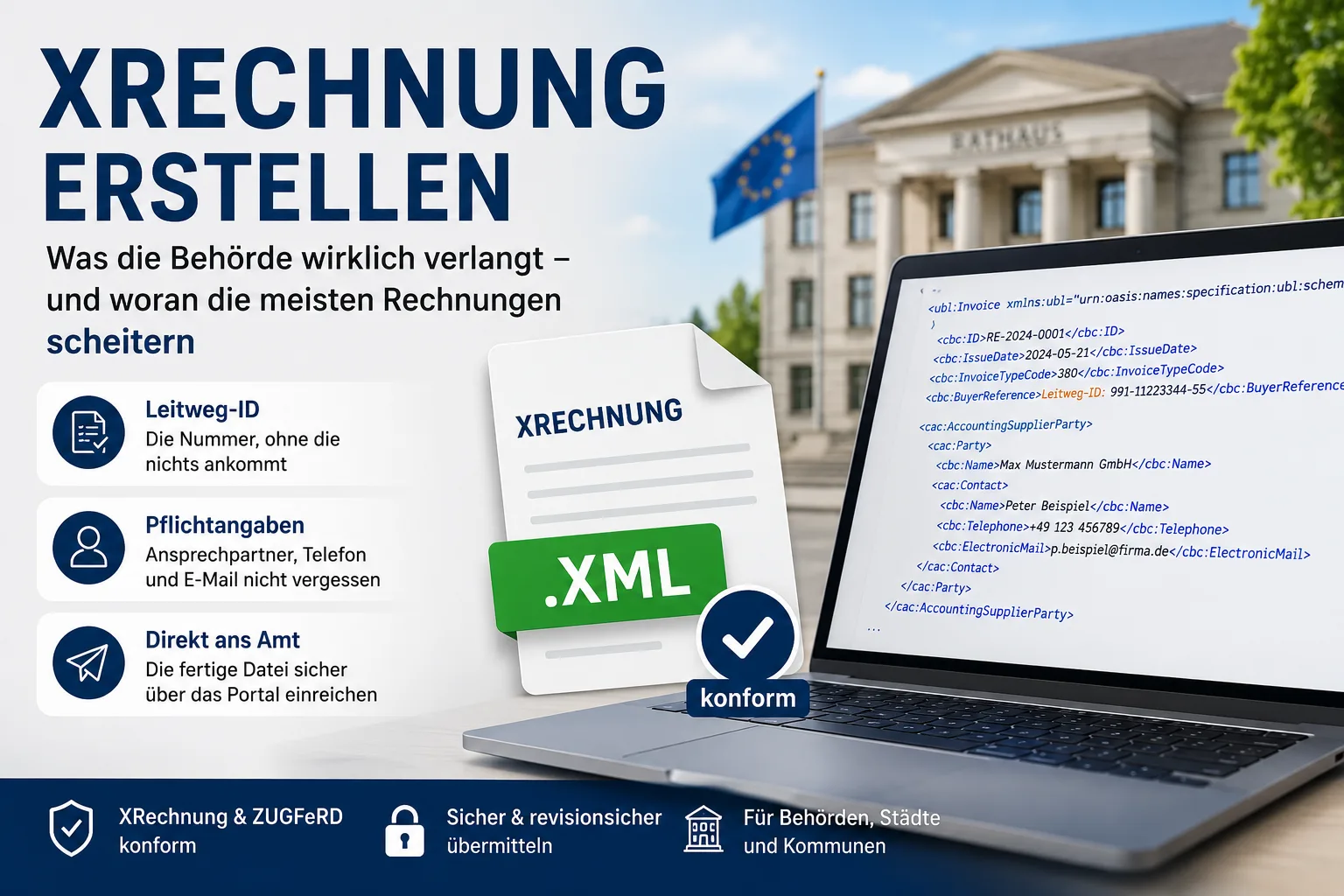
An XRechnung is not a special invoice template. It is your perfectly ordinary invoice, only as a pure data file in XML format: no logo, no layout, nothing to print. It looks like computer gibberish because that is exactly what it is for – the authority's software is meant to read the amounts without a human retyping them.
That is also why you do not write an XRechnung yourself; you have it generated. There are two realistic routes: you type the invoice into the customer's invoicing portal free of charge, or your invoicing program builds the file at the push of a button from the invoice you are writing anyway.
What trips people up in practice is rarely the technology. It is the Leitweg-ID – a routing number that never existed on paper invoices, which the public customer gives you when placing the order, and without which the portal rejects your invoice before any human ever sees it. On top of that come three details about yourself that are mandatory in an XRechnung but probably missing from your current PDF invoice: the name of a contact person, a phone number and an email address.
This article describes the rules that apply in Germany.
Contents
- What an XRechnung is – and what it is not
- The two ways to create an XRechnung
- The Leitweg-ID: the number that usually causes the failure
- The details an XRechnung absolutely requires
- Where the finished file goes
- Do I even have to? The 1,000-euro threshold and other exceptions
- „Creating an XRechnung from a PDF" – why there is no such button
- And to ordinary companies? What 2027 and 2028 bring
- When the invoice is rejected
- Can I check the file beforehand?
- Do I have to keep the XML file – or is a printout enough?
- Which version you need – and what changes soon
What an XRechnung is – and what it is not
XRechnung is the data format that the German federal government, the states and the municipalities agreed on. If you open the file, you see text in angle brackets – every detail sits in its own field so the other side knows exactly which figure is the net amount and which is the tax.
Three things that regularly get mixed up:
A PDF invoice is not an e-invoice. Not even if you send it by email. For the authority only the data file counts; a PDF on its own is not accepted.
XRechnung and ZUGFeRD are not the same thing. ZUGFeRD is a PDF invoice that carries the data file hidden inside it – so you still see a perfectly normal invoice. The XRechnung is the bare file with no visual side. Which one to use when is explained in detail in our article XRechnung or ZUGFeRD: the difference explained simply. How to produce a ZUGFeRD invoice is shown in creating a ZUGFeRD invoice.
You need no signature and no seal. An electronic signature is not required for an XRechnung.
Easy Invoice creates and receives XRechnung and ZUGFeRD e-invoices in every plan, see plans and prices.
The two ways to create an XRechnung
Route 1: type it into the portal, free of charge
The invoicing portals of public customers offer what is called web capture: an online form into which you type your invoice. The XRechnung is created from it, and it is submitted at the same time. Registration is free for invoice senders, and nothing is charged per invoice either.
This is worth it if you bill an authority two or three times a year. The price you pay: you type every line item a second time, because the invoice already exists in your own bookkeeping. And you have to find your login details again the next time – perhaps eight months later.
Route 2: export it from your invoicing program
The usual route as soon as there are more than a handful of invoices a year: you write the invoice as always and choose XRechnung instead of PDF as the output format. The program builds the file and tells you in advance if a mandatory detail is missing.
Easy Invoice in the office1.cloud works this way too: for each invoice you choose whether an XRechnung or a ZUGFeRD invoice should be produced. You store the Leitweg-ID once with the customer so that it travels with every further invoice to the same authority automatically. If a mandatory detail is missing, the program shows you which one before generating – but that does not replace the official check, which only happens on submission.
There is a third route: hiring a service provider to handle the transmission for you. That is a topic for businesses with many public customers and their own ERP system, not for a trade business with three authority invoices a year.
The Leitweg-ID: the number that usually causes the failure
The Leitweg-ID is the authority's address inside the invoicing system – think of it as a telephone extension. It makes sure your invoice does not land somewhere in the building but with the unit that placed the order.
You do not need a Leitweg-ID of your own. You receive the customer's. They tell you when placing the order – it appears on the order confirmation, in the award letter or in the order email. If you cannot find it there, ask your contact before you generate the invoice. That is a two-line email and saves you two weeks.
It is built from three parts separated by hyphens: a coarse address of up to twelve digits, a fine address of up to thirty digits, and a two-digit check number at the end. The check number is a control figure – it catches you out if you mistype while copying. The first figure also tells you where the invoice is going: 991 stands for federal authorities and constitutional bodies themselves, 992 for institutions that belong to the federal level without being an authority – social insurance funds or federal agencies, for instance – and 993 for such institutions that run their own invoice inbox instead of the central platform. States and municipalities have their own number ranges.
In the invoice, the Leitweg-ID goes into the field „buyer reference" (BT-10 in technical language). If your program offers a field with that name, that is exactly where it belongs – not in the subject line and not in a remarks field.
The most common mistakes are unspectacular: one space too many, a hyphen in the wrong place, a digit copied wrongly. The check number catches it and the platform rejects. So copy the ID out of the email rather than typing it.
The details an XRechnung absolutely requires
Much of this is on your invoice anyway. What matters are the fields nobody misses on a PDF invoice and that are checked strictly here:
- A contact person, phone number and email address for you. All three are mandatory in an XRechnung. Many invoice templates give only the company address – then three fields are missing at once.
- An electronic address for the sender, as a rule your email address. That too is a separate field, not running text.
- The customer's Leitweg-ID as the buyer reference.
- Your VAT identification number or your tax number. One of the two must be there.
- Your IBAN, if payment is to be made by bank transfer.
- Invoice number, invoice date, supply date or supply period, plus, for each line, the description, quantity, unit price and tax rate.
- As a small business under § 19 UStG, additionally the note that you do not charge VAT. Without a tax rate and without a reason, the data set will not go through.
Not every missing field leads to rejection – but the ones listed do, and you only find out on submission. Store these details cleanly in your master data once and the topic is settled for good.
Where the finished file goes
For invoices to the federal administration there has been one central platform since September 2025: the OZG-RE. The formerly separate central invoice receipt platform (ZRE) has been merged into it. If you find an older guide online explaining two portals and recommending an account with both: it is out of date.
There you can deliver your invoice in four ways: type it into the web capture form, upload the finished file, send it by email to an address assigned to you, or have it transmitted via Peppol. Peppol is a European delivery network for invoices – think of it as a closed postal system in which every authority has a fixed address; you need a provider to connect you to it. For a small business, web capture and upload are the realistic routes.
For states and municipalities this does not apply automatically. Each federal state decides for itself from when and by which route it accepts e-invoices; some states run their own portals, others share the federal one. So the reliable answer is not in an overview table on the internet but in your order letter – that is where it says where the invoice should go. If the note is missing, ask.
As a format, the federal administration accepts the XRechnung as well as ZUGFeRD in the XRECHNUNG profile, but then only the pure data file without the PDF visual format. An ordinary PDF is not accepted as an invoice.
Do I even have to? The 1,000-euro threshold and other exceptions
Invoices to the federal administration must in principle be sent electronically. The federal E-Invoicing Regulation does allow exceptions, and the first one concerns many small businesses: for direct awards up to an order value of 1,000 euros you may still bill on paper. Further exceptions apply to invoice data requiring secrecy and to procurement abroad and in the foreign service.
What matters is the difference between „may" and „should": many offices want the invoice electronically even below the threshold. And if the order carries a Leitweg-ID, the matter is settled anyway.
States and municipalities may apply different thresholds. That, too, is in the order letter.
„Creating an XRechnung from a PDF" – why there is no such button
People search for this a lot, and the honest answer is: a PDF cannot be „converted" into an XRechnung, at least not reliably.
The reason is simple. A PDF contains no data, only a picture of data. The file itself does not know that „1,428.00" is the gross amount and not an article number – only your eye can tell. A converter has to guess. With clean, always identical layouts that often works; with an invoice containing a discount line, mixed tax rates or a deduction for an advance payment, it guesses, and it does so unnoticed.
Two cases are easily confused:
- PDF with an embedded file (ZUGFeRD): here the data set is already inside and can be extracted cleanly. That is not converting, it is unpacking.
- An ordinary PDF: here the only remedy is to capture the invoice again as a data set, in your program or in the portal.
So if you currently have a PDF in front of you that is supposed to become an XRechnung: enter the invoice again. With one line item that takes three minutes – less than hunting for the error after a converter has muddled up your tax rate.
And to ordinary companies? What 2027 and 2028 bring
Invoices between companies inside Germany follow their own deadlines, and XRechnung is not mandatory there – any format that complies with the European standard EN 16931 is permitted. In practice that means: XRechnung or ZUGFeRD, your choice. Many businesses go with ZUGFeRD because the recipient then still sees a perfectly normal invoice.
The deadlines at a glance:
| Period | What applies |
|---|---|
| since 01.01.2025 | You must be able to receive e-invoices. This applies to small businesses too. |
| until 31.12.2026 | For sending, paper is still allowed; PDF only if the recipient agrees. |
| from 01.01.2027 | Businesses with more than 800,000 euros of prior-year turnover must send e-invoices. |
| from 01.01.2028 | The sending obligation applies to all companies. |
Exempt are, among others, small-amount invoices under 250 euros and travel tickets. Small businesses under § 19 UStG may continue to issue paper or PDF – but they still have to receive. What that means in practice is set out in E-invoicing for small businesses, and the stages are covered in detail in E-invoicing obligation 2027 and 2028. On the 250-euro threshold we have compiled the mandatory details in Small-amount invoice up to 250 euros.
All of this is general information and not legal or tax advice; for your individual case your tax adviser remains responsible.
When the invoice is rejected
There are two completely different rejections, and telling them apart decides what you have to do.
The platform rejects. This happens immediately on submission, usually with an error message such as „BR-DE-…" and a field name. That invoice never reached the recipient. In practice this means: you need no cancellation invoice, you fix the error and submit the same invoice with the same number again.
The authority objects to the content, for example because an item was not ordered. Then the invoice has been delivered and you correct it the usual way – how to do that cleanly is explained in Correcting an invoice: cancellation and correction.
A practical point about payment terms: an invoice stuck in the portal has not started any deadline running. If you only notice after four weeks that submission failed, you wait correspondingly longer for your money. So the first time round, check on the same day whether submission was acknowledged as successful.
Can I check the file beforehand?
Partly. The binding check happens on submission – only there does the official validation software run, and only its verdict counts.
Beforehand you can do two things. First: almost every invoicing program checks the mandatory fields before it generates the file and names the missing ones. Second: you can look inside the generated file without having to read XML. That is what our free e-invoice viewer is for – you upload the file and see its contents as a readable invoice. You notice immediately if the Leitweg-ID is missing or an amount sits in the wrong field. It does not, however, tell you whether the file meets every official rule – that is decided by the check on submission.
One practical tip for your very first XRechnung: submit it as soon as it is ready, not on the last day. The first time round something small is almost always missing, and you want to be able to add it calmly.
Do I have to keep the XML file – or is a printout enough?
The file. A printout is not enough.
With an e-invoice, the structured part – precisely the XML file you generated – is the original. It has to be kept unchanged, for eight years; § 14b UStG requires this for every incoming and outgoing invoice. You only have to keep an additional PDF if it carries details that are missing from the file and matter for taxation, such as a posting note.
In practice that means: if you type the invoice into the customer's portal, download the generated file afterwards and file it. Do not rely on the portal keeping it for you for eight years. Anyone working from an invoicing program has this covered automatically – there the file stays attached to the document.
Which version you need – and what changes soon
The version currently in force is XRechnung 3.0.2; the most recent release is a bugfix bundle dated 31 January 2026. For you this is usually not a decision: the portal and your invoicing program produce the valid version, you set nothing.
XRechnung 4.0 has been announced. It implements the revised European standard EN 16931-1:2026 and, according to the responsible coordination office, is expected in mid to late 2026 – the date depends on the publication of the standard and is expressly provisional. A gradual transition is planned; there are no binding cut-off dates so far. In practice: if your software is maintained, the new version reaches you as an update and you have nothing to do.
What deserves your attention over the coming months is 1 January 2027. Until then paper invoices remain permitted in business-to-business dealings – after that not for everyone. Anyone already producing an XRechnung for a public customer has the more unpleasant part behind them anyway.
Official sources: E-invoicing of the federal administration: FAQ and Leitweg-ID · XRechnung – versions and bundles (KoSIT) · Federal E-Invoicing Regulation · § 14b UStG – retention of invoices
Handle invoices more easily
Easy Invoice combines quotes, invoices and customer management in the cloud.
Try Easy InvoiceRead next
 Invoicing & Accounting
Booking private withdrawals in Germany: accounts, tax, contributions
A private withdrawal is not a salary and does not lower your profit. Which accounts apply, when VAT is due on goods and the car, and what goes into the Anlage EÜR.
 Invoicing & Accounting
Cost estimate in Germany (Kostenvoranschlag): template and what goes in
A German cost estimate (Kostenvoranschlag) is an estimate, not a fixed price. With a sample to copy: what goes in, which sentences protect you from disputes and when it may cost money.
 Invoicing & Accounting
Receipt lost? How to write an Eigenbeleg in Germany
No booking without a receipt – but there is a substitute. What belongs on a German Eigenbeleg, when the tax office accepts it, and why the VAT is gone anyway.