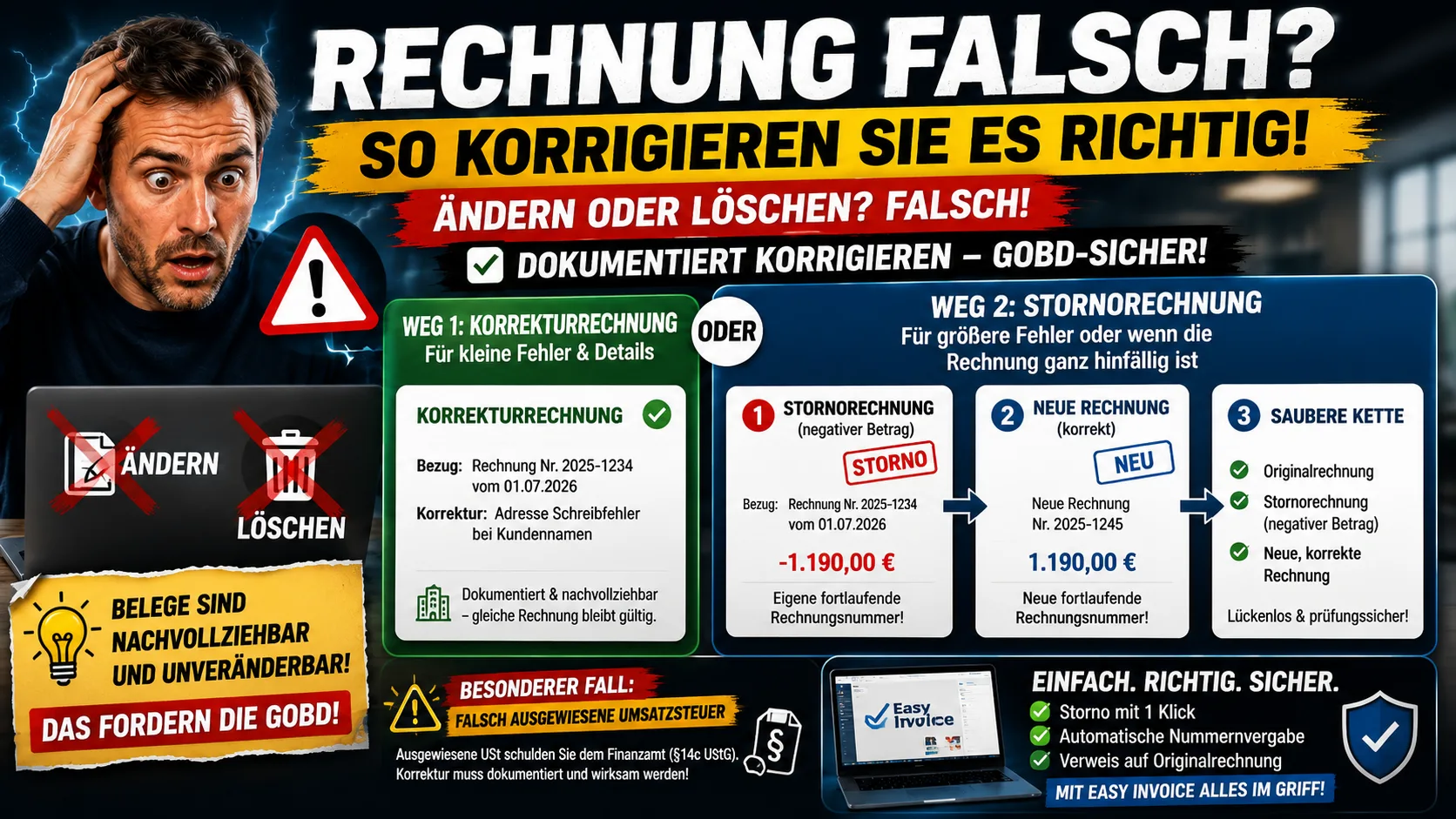
Wrong amount, a typo in the address, VAT stated by mistake: once the invoice is already with the customer, the first impulse is to open the file and change it quickly – or to delete it and write a new one. Both are the wrong way to go. Why, and how to do it properly, is what this article clarifies.
Why You May Not Simply Change an Invoice
As soon as an invoice is issued and sent, it counts as a document. Documents must be traceable and unalterable – that is required by the principles of proper bookkeeping (GoBD – German principles for the proper keeping and retention of books, records and documents in electronic form). Overwriting an already sent invoice after the fact, or deleting it without a trace, would break this traceability. If an audit comes, either a document is missing or two different versions of the same invoice number exist – both stand out negatively.
The solution is not to hide the error but to correct it in a documented way. There are two routes for this.
Route 1: The Correction Invoice (Invoice Correction)
The correction invoice is suitable for smaller errors, where the invoice amount is right or only one detail changes – for example a transposed number in the address, a wrong description of the service or a forgotten detail.
You do not write a completely new document but a correction document that clearly refers to the original invoice: with its invoice number and date, plus a statement of what is being corrected. The clear reference is what matters – the customer and the tax office must be able to see which invoice is being put right by it.
Route 2: The Cancellation Invoice
The cancellation invoice is the route for larger errors or when the invoice is void altogether – wrong amount, wrong recipient, issued twice, or the order fell through.
Here is how it runs cleanly:
- You create a cancellation invoice: in content a copy of the original invoice, but with a negative amount. It thereby cancels the original invoice arithmetically.
- The cancellation invoice gets its own sequential invoice number – not that of the original invoice.
- It refers to the original invoice (its number and date) so that the connection is clear.
- Then – if needed – you write a new, correct invoice, again with its own number.
In the end, three documents exist: the faulty original invoice, the cancellation invoice that offsets it, and the new correct invoice. It is exactly this unbroken chain that an audit expects. If it is not an error at all but a later refund to the customer, you do not need a cancellation – see creating a credit note.
Special Case: VAT Stated Incorrectly
An error with a weight of its own: if too much or unwarranted VAT was stated – for example as a small business, or with 19 instead of 7 percent – you initially owe the amount stated to the tax office (§ 14c UStG). This too can be corrected, but it is not enough to quietly change the figure: the correction must be documented and take effect towards the customer. In such cases it is worth a quick look with your tax adviser before the correction, so that the adjustment also takes hold for tax purposes.
The Convenient Way
The reason many break into a sweat when correcting is usually the numbering: cancellation with its own number, a reference to the original, a new invoice again with its own number – done by hand this is error-prone. Invoicing software takes exactly that off your hands: in Easy Invoice on office1.cloud you generate the cancellation invoice for an existing invoice at the click of a button, including the negative amount, the correct number and the reference to the original – the chain stays clean automatically.
How an invoice looks complete from the outset, so that it never comes to a correction in the first place, is shown in our guide to writing an invoice.
_This article gives a general overview and is no substitute for tax advice. What matters is your specific individual case; when in doubt, your tax adviser can help._
Handle invoices more easily
Easy Invoice combines quotes, invoices and customer management in the cloud.
Try Easy InvoiceRead next
 Invoicing & Accounting
Invoicing with a Kleingewerbe in Germany: sample, template, details
With a Kleingewerbe (small trade business), you write invoices like any other business. Whether VAT is added does not depend on the trade, but on the small business scheme (Kleinunternehmerregelung). Here you find the mandatory details for both cases and a sample to copy.
 Invoicing & Accounting
Showing a discount on an invoice in Germany: template, VAT, example
A discount is deducted from the net amount, and VAT is calculated afterwards. Here are two templates to copy, the rules for discount codes and vouchers, and what applies if you grant the reduction only after the invoice.
 Invoicing & Accounting
Freelancer invoices in Germany: template, required details, VAT
As a freelancer (Freiberufler) in Germany, you write invoices without registering a trade, but with the same mandatory details as any business. One question decides: do you add VAT or not? Here you find the answer for your case and a template for each of the three cases.