The choice of invoicing software is huge, and most comparison lists mainly drive home one thing: there are too many. More useful than yet another ranking is the question of which features actually count for you as a small business. Once you know those, you can make the decision in a few minutes – regardless of which names are being promoted at the moment.
First: what you really need – and what you don't
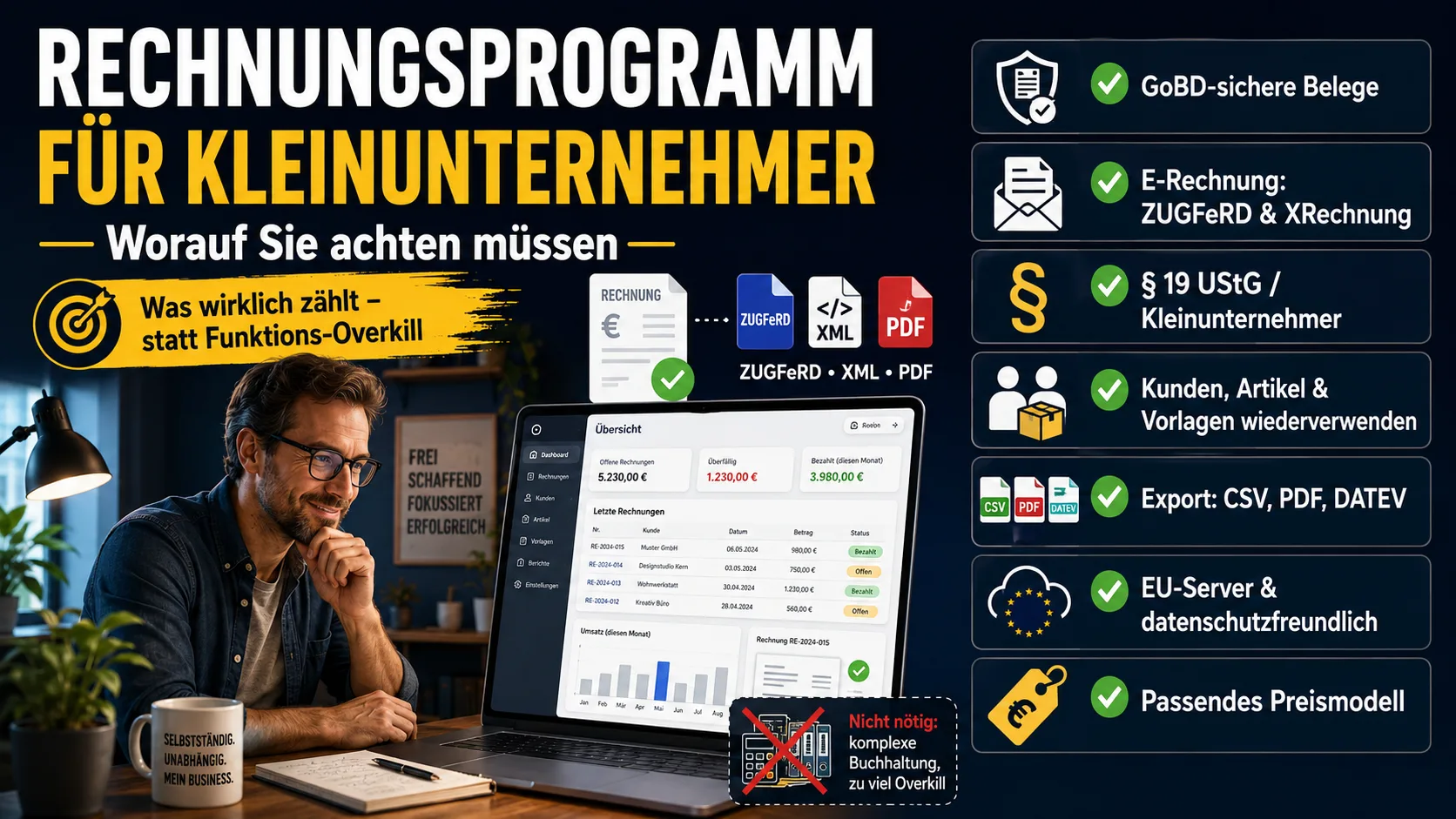
As a small business under § 19 UStG, you don't state VAT. That simplifies a lot: you need no advance VAT return, no complex tax logic, no bookkeeping with a chart of accounts. Many programs are built for exactly those things – and are correspondingly expensive and overloaded.
For the start, then, the full feature set matters less than the question: does the program cleanly cover what you do every day – writing invoices and quotes – and does it grow with you if you later become liable for VAT after all? Anything beyond that is, in the first step, an extra. Whether the small-business status is even worth it for you depends above all on your customers – you can read more in Writing an Invoice Without VAT (§ 19 UStG).
If you want to write invoices with all mandatory details in a few minutes, you can try the invoicing software Easy Invoice free for 10 days.
A must, not an extra: GoBD-compliant
The most important point isn't one that gets advertised – it's a legal foundation: the program must create and retain invoices in a GoBD-compliant way. In concrete terms that means: sequential invoice numbers assigned automatically, no documents that can be overwritten after the fact, audit-proof filing. A tool that lets you simply delete or change finished invoices fails here – however slick it looks.
E-invoicing: receive today, issue tomorrow
Since 2025, every business in the B2B space must be able to receive and read e-invoices – small businesses included. For issuing them, transition periods still apply to small operators, but the direction is clear. A program that can not only display structured formats like ZUGFeRD and XRechnung but also produce them itself takes this topic off your plate for good. How the two formats differ is explained in XRechnung or ZUGFeRD?.
Everyday use decides: the usability
You don't use a program for its feature list, but because it makes the same recurring steps quick. Check whether
- customers and products can be set up once and reused,
- a quote turns into an invoice with a single click,
- invoice numbers are assigned automatically and without gaps,
- recurring invoices can be saved as a template.
These are the things that, over the weeks, make the difference between "done on the side" and "costs me every Friday evening."
Your data must belong to you
An often-overlooked point: can you get back out again? Before you start, check whether customers, products and invoices can be exported as CSV or PDF, and whether there's a DATEV export for your tax advisor. Anyone who can take their data with them at any time is tied to no provider. With a cloud solution, it's also worth looking at the server location and how your data is handled – for GDPR purposes, a provider with servers in the EU is the more straightforward choice.
What it may cost
The price should match the number of invoices you write. If you write a handful of invoices a month, you don't need a package built for high-volume users. Free entry-level options look tempting, but almost always have limits – where the catches lie is covered in Free Invoicing Software: Where's the Catch?.
The checklist at a glance
A suitable invoicing program for a small business should:
- work in a GoBD-compliant way (immutable documents, gap-free numbering),
- be able to receive and issue e-invoices (ZUGFeRD, XRechnung),
- reflect the small-business status without detours (no VAT stated, the correct § 19 note),
- store customers, products and templates so they can be reused,
- keep your data exportable (CSV, PDF, DATEV),
- process data in a GDPR-compliant way, ideally on EU servers,
- have a pricing model that matches your invoice volume.
Anyone who works through these points quickly finds out what fits. Easy Invoice on office1.cloud is tailored precisely to small businesses and the self-employed and covers the list – but the criteria apply regardless of what you decide on.
Handle invoices more easily
Easy Invoice combines quotes, invoices and customer management in the cloud.
Try Easy InvoiceRead next
 Invoicing & Accounting
Invoicing with a Kleingewerbe in Germany: sample, template, details
With a Kleingewerbe (small trade business), you write invoices like any other business. Whether VAT is added does not depend on the trade, but on the small business scheme (Kleinunternehmerregelung). Here you find the mandatory details for both cases and a sample to copy.
 Invoicing & Accounting
Showing a discount on an invoice in Germany: template, VAT, example
A discount is deducted from the net amount, and VAT is calculated afterwards. Here are two templates to copy, the rules for discount codes and vouchers, and what applies if you grant the reduction only after the invoice.
 Invoicing & Accounting
Freelancer invoices in Germany: template, required details, VAT
As a freelancer (Freiberufler) in Germany, you write invoices without registering a trade, but with the same mandatory details as any business. One question decides: do you add VAT or not? Here you find the answer for your case and a template for each of the three cases.