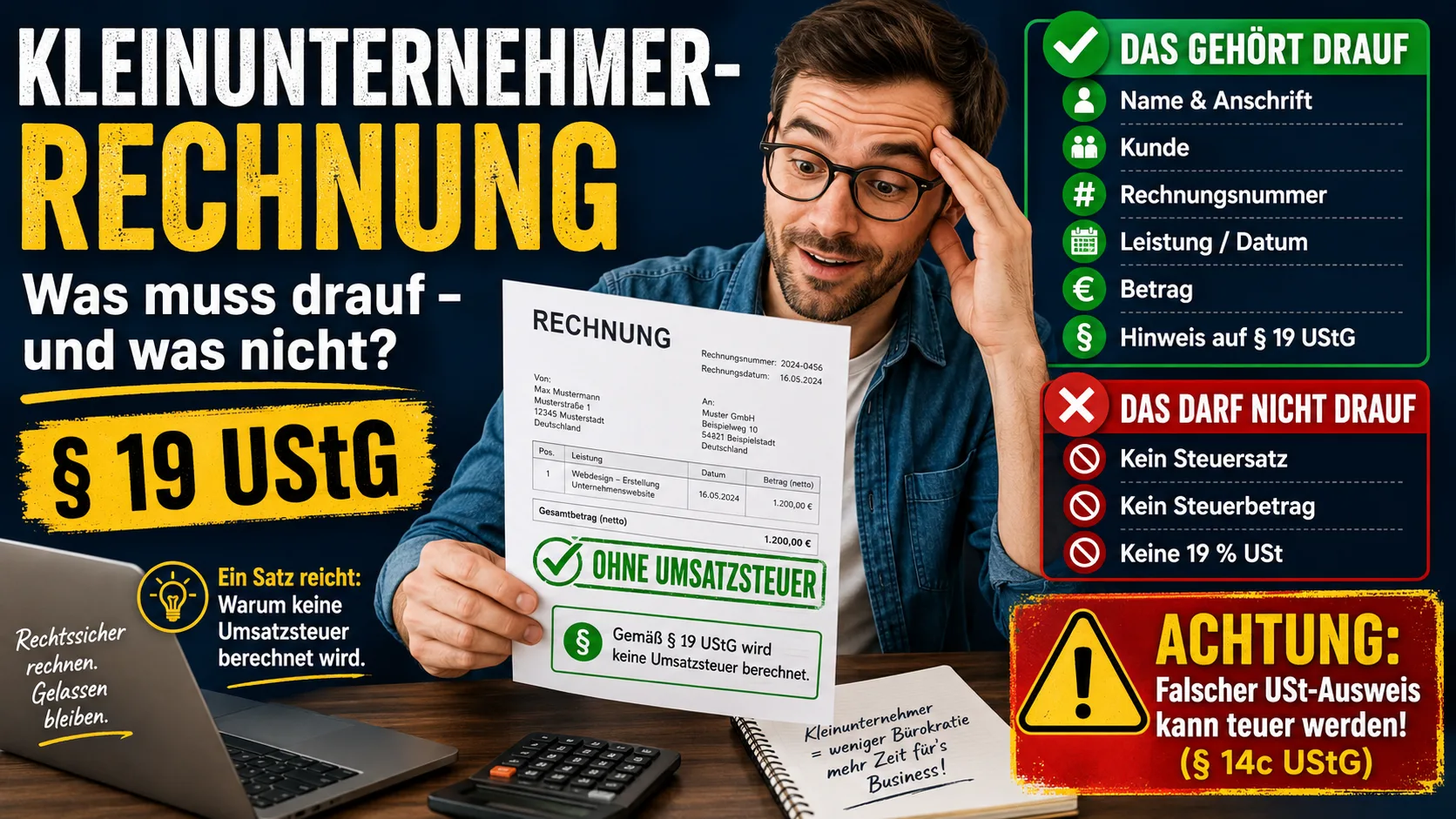
As a small business under § 19 UStG (section 19 of the German VAT Act), you issue invoices without VAT. It sounds simpler than for everyone else – and it is. Two things still often go wrong: the mandatory note is missing, or a tax amount ends up on the invoice after all. Both can be avoided in two minutes.
What Is Missing on the Invoice – and What Is Not
Without VAT means: your invoice shows no tax rate and no tax amount. The invoice amount is at the same time the final amount – no line saying "plus 19 % VAT".
Since 1 January 2025, the law requires only these details on a small business invoice (§ 34a UStDV):
- your full name and address,
- the name and address of the customer,
- your tax number (or VAT identification number, if you have one),
- the date of issue,
- the quantity and type of the goods or the type and scope of the service,
- the invoice amount as a single total with the notice on the small business scheme.
§ 34a UStDV does not require a sequential invoice number or the date of supply. Both still help you match payments, and both become mandatory as soon as you leave the small business scheme. A complete sample is shown in the article Writing an invoice with a Kleingewerbe.
Only for amounts up to 250 euros gross may you keep it shorter – then the rules of the small-amount invoice apply.
The Mandatory Note on § 19 UStG
Because the VAT is missing, you must state the reason for it. A customer – and the tax office – must be able to see that no tax is deliberately being charged here and that this is not an error. No exact wording is prescribed; common and accepted examples are:
"In accordance with § 19 UStG, no VAT is charged."
"In accordance with § 19 UStG, the amount stated does not include VAT."
"No VAT is shown, as a small business under § 19 UStG."
One sentence is enough, usually at the end of the invoice below the amount line. The template in the article writing freelancer invoices in Germany shows a complete invoice with this note.
The Expensive Trap: Accidentally Stating VAT
The mistake that costs money: you reuse an old template or use a program with a preset tax rate – and suddenly "19 % VAT: 38.00 €" appears on the invoice. Anyone who, as a small business, states VAT even though they are not entitled to do so still owes that amount to the tax office (§ 14c UStG). You would have to pay the tax over without having budgeted for it.
This can be corrected by issuing a correction to the invoice – but the simplest route is not to let it happen in the first place. Make sure your template or software is set to "small business / no VAT". In Easy Invoice on office1.cloud you set the status once – after that the note appears automatically and no tax rate is shown. If instead you refund a customer later on, that is not an error but a reduction in consideration – see creating a credit note.
May Small Businesses Send a PDF Invoice?
For the receipt of e-invoices, the following applies: even as a small business you should be able to accept and read structured invoices. When it comes to issuing them, there are simplifications and transitional rules that have changed several times in recent years. Because things are in motion here, it is worth checking the current state of play – details in our article E-invoicing obligation for small businesses.
A Word on the Effect on the Customer
Some founders worry that an invoice without VAT looks "unprofessional" or reveals their small turnover. The opposite is true: the § 19 note is a perfectly normal, familiar sentence. Business customers know it – and for private customers your service is simply 19 percent cheaper than with a VAT-liable provider. Whether the status is even worthwhile for you depends above all on your customers; we worked through that in Small-business scheme – yes or no?.
_This article gives a general overview and is no substitute for tax advice. What matters is your specific individual case; when in doubt, your tax adviser can help._
Handle invoices more easily
Easy Invoice combines quotes, invoices and customer management in the cloud.
Try Easy InvoiceRead next
 Invoicing & Accounting
Invoicing with a Kleingewerbe in Germany: sample, template, details
With a Kleingewerbe (small trade business), you write invoices like any other business. Whether VAT is added does not depend on the trade, but on the small business scheme (Kleinunternehmerregelung). Here you find the mandatory details for both cases and a sample to copy.
 Invoicing & Accounting
Showing a discount on an invoice in Germany: template, VAT, example
A discount is deducted from the net amount, and VAT is calculated afterwards. Here are two templates to copy, the rules for discount codes and vouchers, and what applies if you grant the reduction only after the invoice.
 Invoicing & Accounting
Freelancer invoices in Germany: template, required details, VAT
As a freelancer (Freiberufler) in Germany, you write invoices without registering a trade, but with the same mandatory details as any business. One question decides: do you add VAT or not? Here you find the answer for your case and a template for each of the three cases.