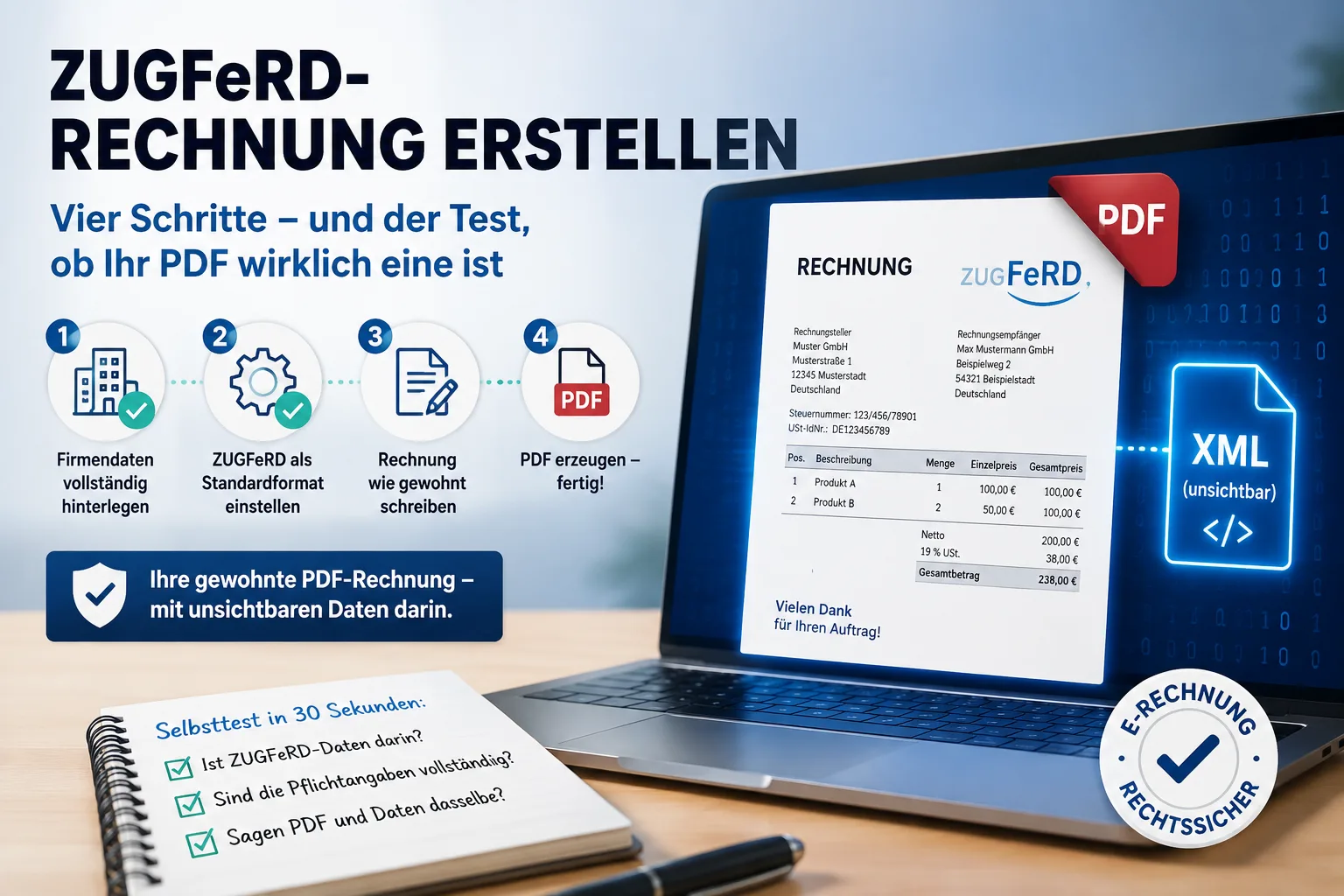
A ZUGFeRD invoice is your perfectly ordinary PDF invoice with an invisible data file tucked inside it. So you do not write the invoice any differently than before. You set the format to ZUGFeRD once in your invoicing software, fill in the invoice as usual and download the PDF – done. Only one thing is new: a handful of details really do have to be complete – your address, your tax number, your customer's country. If one of them is missing, you still get a PDF, but without the data inside. And you cannot tell by looking at it. That is why this article covers not only how to create a ZUGFeRD invoice, but also how to check in half a minute whether you actually produced one.
Contents
- Creating a ZUGFeRD invoice: the four steps
- Do I need new software for this?
- Can I convert a finished PDF into ZUGFeRD?
- These details have to be complete
- Is my PDF really a ZUGFeRD invoice?
- What is this „profile" – and do I have to choose one?
- How do I send the invoice?
- When the PDF and the data say different things
- What do I have to keep: the PDF, the printout or the XML?
- Do I even have to do this yet?
- ZUGFeRD or XRechnung – what does my customer want?
Creating a ZUGFeRD invoice: the four steps
The process has four steps, and three of them you do exactly once – after that every further invoice comes out in the right format by itself.
1. Complete your company details. In the settings under „company profile", your company name, street, postcode, town and country need to be filled in, along with your VAT identification number or your tax number. Either one is enough. If your customers pay by bank transfer – the normal case – you also need a bank account with an IBAN on file.
2. Set the default format to ZUGFeRD, once. Also in the company profile. From then on ZUGFeRD is pre-selected for every new invoice and you never have to think about it again.
3. Write the invoice exactly as before. Pick the customer, enter the line items, prices, tax rate. Nothing about this changes.
4. Generate the PDF. That is it. What you download is a ZUGFeRD invoice: a PDF that looks and prints just like before, with the invoice data additionally sitting inside it as a file.
Two more things are worth knowing. First, the format can also be switched for a single invoice if one particular customer wants something else – on the document itself, in the „e-invoice" section. Second, ZUGFeRD only exists for invoices, credit notes and down payment invoices. It is not intended for a quote or a delivery note, because those are not invoices. If you find no option there, nothing is broken.
Easy Invoice creates and receives XRechnung and ZUGFeRD e-invoices in every plan, see plans and prices.
Do I need new software for this?
This is the question that usually hides the real worry: is this going to cost me money?
Word and Excel will not do it. Those programs can produce a PDF, but they cannot place invoice data inside it – and that data is exactly what makes the difference. However beautifully designed it looks on screen, such a PDF is and remains a picture of an invoice, not an e-invoice. Why that increasingly causes friction elsewhere too is covered in our article on whether you may write invoices with Word or Excel.
There are free web tools where you type in an invoice and get a ZUGFeRD file back. For two invoices a year that is an honest option. The catch: you retype everything every time – your company details, the customer, every line item. From the third or fourth invoice a month onwards it is the more expensive route, except you pay in time rather than money.
Anyone writing invoices regularly sets it up once in their invoicing software and is done with the topic.
Can I convert a finished PDF into ZUGFeRD?
This question comes up a lot, and the answer is unsatisfying but honest: no, at least not in a way you should trust.
The reason lies in what ZUGFeRD actually is. The data in the file has to come from the invoicing process itself – from the line items, prices and tax rates you entered. A tool that is supposed to convert a finished PDF after the fact would have to read the amounts out of the picture of the invoice and, when in doubt, guess. If it misses a line item or confuses net and gross, the result is an invoice whose data claims something different from the page your customer reads. Why that is a real problem is explained further down in the section on which part takes precedence.
So the route runs the other way round: first the invoice in the software, then the PDF and the data are produced together in a single step. The same applies to the free web tools – there too you type the invoice in rather than uploading an existing one.
If you need an older invoice as ZUGFeRD after the fact because a customer asks for it, enter it again in your software and generate it from there.
These details have to be complete
This is where people actually stumble. A ZUGFeRD file only comes out clean if certain fields are filled in. If something is missing you still get a PDF – just an ordinary one, with no data inside.
| Where to enter it | What is needed |
|---|---|
| Company profile | Company name, street, postcode, town, country |
| Company profile | VAT ID or tax number |
| Company profile | IBAN (if the customer pays by transfer) |
| Customer record | The customer's name and their country |
| Invoice | At least one line item with a product or service description |
The customer's country is the one most often overlooked, because it does not appear on the printed invoice at all for domestic customers. It still has to be in the data.
One piece of reassurance: you do not need the Leitweg-ID for ZUGFeRD. That is the long routing number public authorities require – it belongs to the XRechnung. How that works is covered in the article on creating an XRechnung.
Good invoicing software checks this for you before it generates the PDF and tells you which detail is missing – rather than quietly sending you off with half an e-invoice.
Is my PDF really a ZUGFeRD invoice?
This is the awkward property of ZUGFeRD: a genuine ZUGFeRD invoice and a perfectly ordinary PDF look completely identical on screen. You can print them, lay them side by side and find no difference. Anyone who gets it wrong only notices when the customer's accounts department gets in touch – in the worse case four weeks later, when the money fails to arrive.
There are two easy ways to check for yourself.
Way 1: upload the file and have it looked at. Drag the file into our free e-invoice viewer. It tells you two things: whether there is an e-invoice inside at all – and if so, which kind. ZUGFeRD and XRechnung are both recognised and named. If it is merely an ordinary PDF, you are told that just as clearly. After that you see the data it contains as a readable invoice and can check whether amounts, tax rates and line items are where you expect them. You need no account and have to install nothing; the uploaded file is not stored.
That also answers the most common follow-up question of all: if a customer sends you a file and you have no idea what you are looking at, the same route settles it in half a minute.
Way 2: the paperclip in your PDF program. It works without the internet too. Open the PDF in Adobe Acrobat Reader and look for the attachments symbol in the sidebar – it looks like a paperclip. If a file named factur-x.xml is listed, you have a ZUGFeRD invoice. If the list is empty or there is no paperclip at all, it is an ordinary PDF. (The file name looks French, and so it is: Factur-X is the French name for the same format.)
Do this test once, on your very first ZUGFeRD invoice. After that you know your setup is right and you never need to repeat it.
And if the customer's accounts department rejects the invoice? In practice it comes down to one of three things: the file is in truth an ordinary PDF (way 1 shows that immediately), the country is missing from that customer's record, or your tax number or VAT ID is not stored in your company profile. When in doubt, ask which detail exactly was objected to – the accounting systems on the other side usually name it quite precisely.
What is this „profile" – and do I have to choose one?
If you read into the topic you come across words like MINIMUM, BASIC, EN 16931 or EXTENDED. Those are expansion levels: they determine how much information the data file has room for at all.
For practical purposes one sentence is enough: EN 16931 is the right level, and most programs pick it by themselves anyway. There is nothing for you to set.
Only one warning matters. The two smallest levels – MINIMUM and BASIC WL – do not contain the individual line items at all. The German Federal Ministry of Finance has stated explicitly that invoices at these two levels do not count as e-invoices. They are meant as a bookkeeping aid, not as an invoice. If a program or a free web tool offers you that choice: leave it alone.
You can check this on a finished file in the e-invoice viewer as well – alongside the format, it names the level the invoice was produced at.
How do I send the invoice?
Perfectly normally by email, as an attachment, just like your PDF invoices so far. There is no portal to log into, no special transmission route and no registration anywhere. That is the practical advantage of ZUGFeRD over the XRechnung sent to public authorities.
Nor do you need your business customer's consent. In the view of the Federal Ministry of Finance, every company has had to ensure it can receive e-invoices since 1 January 2025 – an email address is enough for that. „Please keep sending me the usual PDF" is therefore a request, not a claim.
And private customers? The rule only applies between businesses. You can keep sending private individuals the usual PDF or paper invoice. If a ZUGFeRD invoice does land in their inbox, that is no problem: for the recipient it is simply a PDF they can open and print.
When the PDF and the data say different things
A ZUGFeRD invoice contains the same invoice twice: once visibly for reading, once invisibly for importing. As long as both come out of the same process, they match.
It gets interesting when they drift apart. There is now a clear statement from the Federal Ministry of Finance on this: for invoices that combine a visible page and data in one file, the data is the leading part. Not what you see, but what is in the file.
For everyday work that means one thing above all: never correct a finished invoice afterwards in the PDF, and certainly not by hand on the printout. The data inside does not change when you do – you would then have two different invoices in one file, and the authoritative one would be precisely the one you did not touch. If something is wrong, issue a correction. How to do that cleanly is covered in correcting an invoice: cancellation and correction.
What do I have to keep: the PDF, the printout or the XML?
Invoices have to be kept for eight years. For an e-invoice one requirement is added: the structured part – that is, the data in the file – has to be preserved intact in its original form.
In practice that means: keep the ZUGFeRD PDF file itself, exactly as you sent it. A printout is not enough. A newly generated PDF, a scan of the printout or a screenshot are not enough either, because the data is lost in the process. Anyone who leaves their invoices in their invoicing software has this covered automatically.
The same rule applies to invoices you receive. In day-to-day work that is underestimated more often than your own sending – we have a separate article on managing incoming invoices.
Do I even have to do this yet?
It helps to look at two things separately here, because they often get mixed up.
Receiving e-invoices has been compulsory for every company since 1 January 2025. An email address is enough.
Issuing is staggered: until 31 December 2026 anyone may still issue an ordinary invoice. Businesses with turnover of no more than 800,000 euros in the previous year have a year longer, so until the end of 2027. From 2028 it applies to everyone in business-to-business trade. Small businesses under § 19 of the German VAT Act are permanently exempt from issuing – but they too must be able to receive. The details and exceptions are in our article on the e-invoicing obligation in 2027 and 2028, and specifically for small businesses in e-invoices for small businesses.
The reason most people start earlier anyway is a different one: larger customers already ask for it today, because their own accounting has switched over. Send a plain PDF at that point and you are not penalised – the invoice simply sits around longer.
ZUGFeRD or XRechnung – what does my customer want?
Short and practical: XRechnung is a pure data file with no visible page and the standard for invoices to public authorities and public sector clients. ZUGFeRD is the PDF with the data inside and the usual route for invoices to companies.
When in doubt ZUGFeRD is the safer choice, because a human can still read the invoice – even if nobody at the receiving end has any special software. We have compared the two in detail in XRechnung or ZUGFeRD? The difference explained simply. If your customer is a public authority and has given you a Leitweg-ID, the route runs via the XRechnung.
Where to start
This order gets you through fastest: complete your company details, switch the format to ZUGFeRD once, generate one invoice, check that one file once. That is the whole changeover – from the second invoice onwards you will not notice it any more.
In the invoicing software of the PepperTools Office Cloud it works exactly like that: set the format once in the company profile, and if a required detail is missing when the PDF is generated, the software tells you beforehand which one. Anyone who wants to try it can do so free for 10 days.
Sources
- German Federal Ministry of Finance: questions and answers on the introduction of mandatory e-invoicing
- BMF circular of 15 October 2025 on issuing invoices under § 14 of the German VAT Act (electronic invoice); ZUGFeRD from version 2.0.1 with the exception of the MINIMUM and BASIC-WL profiles
- Forum elektronische Rechnung Deutschland (FeRD): ZUGFeRD/Factur-X
This article provides general information and does not replace tax or legal advice. For your specific situation please consult your tax adviser.
Handle invoices more easily
Easy Invoice combines quotes, invoices and customer management in the cloud.
Try Easy InvoiceRead next
 Invoicing & Accounting
Booking private withdrawals in Germany: accounts, tax, contributions
A private withdrawal is not a salary and does not lower your profit. Which accounts apply, when VAT is due on goods and the car, and what goes into the Anlage EÜR.
 Invoicing & Accounting
Cost estimate in Germany (Kostenvoranschlag): template and what goes in
A German cost estimate (Kostenvoranschlag) is an estimate, not a fixed price. With a sample to copy: what goes in, which sentences protect you from disputes and when it may cost money.
 Invoicing & Accounting
Receipt lost? How to write an Eigenbeleg in Germany
No booking without a receipt – but there is a substitute. What belongs on a German Eigenbeleg, when the tax office accepts it, and why the VAT is gone anyway.