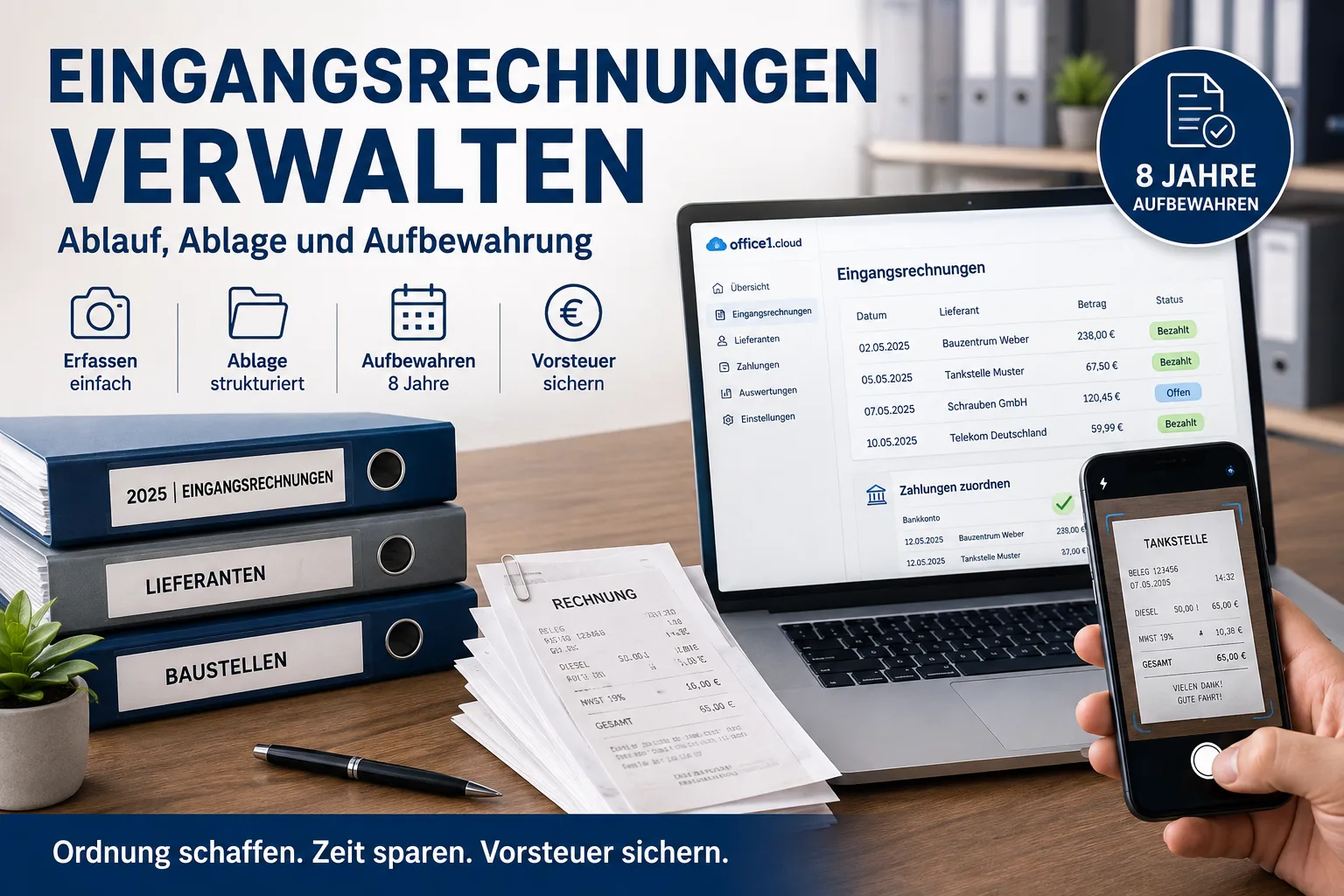
Managing incoming invoices essentially means: capture every receipt digitally straight away – exactly as it arrived – assign it to an expense category, and keep it for eight years. Paper receipts may be photographed and then thrown away. The least effort comes from a program that reads the receipt and matches the payment for you; doing it by hand works too, but needs a tidy folder structure. And if you are worried about the German e-invoicing obligation: if your suppliers still send you ordinary PDF invoices, that is permitted and changes nothing for you.
Contents
- The fastest route: photograph, confirm, done
- The manual route: from receipt to filing
- How to structure your filing – concretely
- Material for the job: which receipt belongs to which project?
- Early payment discount: where the money is in incoming invoices
- Should I worry about e-invoicing? Mostly not
- How long do I have to keep what? 8 years, 10 years, 6 years
- If a genuine e-invoice does arrive: how to recognise it
- What the tax office wants to see during an audit
- Input VAT: the real reason the effort pays off
- Common mistakes and how to avoid them
The fastest route: photograph, confirm, done
An incoming invoice is every invoice you receive: material from the wholesaler, diesel, tools, your mobile contract, office rent. Everything you pay for the business. (The opposite is the outgoing invoice – the one you write to your customers.)
Anyone doing this by hand with folders and file names spends an evening on it every month. With software for incoming invoices, the same task looks like this – using Easy Invoice in office1.cloud as an example:
1. Capture the receipt. Photograph the fuel receipt with your phone or upload the PDF invoice. Amount, date, tax rate and supplier are read out and shown to you as a suggestion. You confirm what is correct with one click – nothing is typed out.
2. Assign it. The supplier is recognised, provided they are already on file. A suitable expense category with the stored account under the German SKR03 or SKR04 chart of accounts is suggested based on your previous entries. If the invoice has been entered before, you get a warning before you record it twice.
3. The receipt stays with the transaction. The original file – the photo, the PDF or the XML file of an e-invoice – is attached directly to the incoming invoice and archived. Once finalised, it can no longer be altered. Folder structures, file naming and backups become unnecessary.
4. Payments match themselves. Import your bank statement as CAMT.053, MT940, CSV, Excel or ODS – the payments are matched to open invoices, and the status moves from open to partly paid or paid. A single payment can be split: material and tools from the same DIY store receipt go to two different accounts, and VAT is calculated separately for each portion.
5. One export at year end. A DATEV booking batch as CSV, or a complete accountant package with booking batch, debtors, creditors, account labels, trial balance and the advance VAT return. The expense list is also available as an Excel file.
If you would like to try it out: register free of charge here.
Everything else in this article applies regardless of whether you use a program: the deadlines, the tax office rules, the input VAT deduction – and how to do it properly without software.
Incoming invoices can be recorded, checked and scheduled for payment with incoming invoice management in Easy Invoice.
The manual route: from receipt to filing
The real problem is rarely the legal side. It is the pile. Receipts come in through three or four channels – by post, by email, as a till slip in your pocket – and whatever is not filed immediately disappears. This routine prevents that, without any additional software:
One inbox for everything. Set up one email address for all invoices and register it with your suppliers. If invoices sometimes go to your private address, sometimes to info@, sometimes by post, something will inevitably get lost.
Digitise paper immediately. Photograph the fuel receipt with your phone while you are still at the petrol station. Thermal paper fades – after two years in the glovebox the till slip is often blank, and then even the best filing system will not help you.
You may throw the paper slip away afterwards. This is permitted and is known as substitutive scanning: if the photo shows the receipt completely and legibly, the paper does not have to be kept. Two exceptions: documents that must remain valid in the original – such as signed annual financial statements or customs papers. That does not apply to fuel receipts or material invoices, so those may go. You should describe your procedure briefly in writing (see procedural documentation).
Capture immediately, do not collect. The receipt goes into your filing when it arrives, not at the end of the quarter. This is less a rule than self-protection: after three months nobody remembers what the 340 euros at the DIY store were for. For cash transactions, income and expenditure should be recorded daily anyway.
Check before you pay. Do quantity, price and terms match your order? Is the invoice even meant for you? That is the moment to catch mistakes – not three months later when the money is gone.
Record category and payment status. What was the expense for (material, vehicle, office, rent), and has it been paid? That is what produces your net income statement at year end – the simple profit calculation most small businesses submit to the tax office – without you having to touch everything again.
Keep the file as it arrived. For anything that comes in digitally: save the original file, not a printout of it. With PDF invoices this goes without saying; with genuine e-invoices it will later become an obligation.
Watch out for duplicate entries. Reminders, duplicates and "copy for your information" regularly cause the same invoice to end up in your filing twice – and in the worst case to be paid twice.
How to structure your filing – concretely
"File your receipts properly" is easily said. Here is a structure that has proved itself in small businesses and that you can set up in five minutes:
Receipts/
  2026/
    Incoming-invoices/
      2026-03-14_Wuerth_Material_248-90.pdf
      2026-03-16_Aral_Diesel_82-40.jpg
    Outgoing-invoices/
    Bank-statements/
  2025/
    ...
Organise by year, not by supplier. That sounds impractical at first, but it is right: retention periods expire by year, and your accountant always needs one financial year as a whole. Anyone sorting by supplier has to go through every folder individually when clearing out.
Name files using the pattern date \_ supplier \_ purpose \_ amount. Put the date first in year-month-day format, and your computer will sort everything chronologically by itself. The amount in the file name sounds excessive but saves enormous time when you are looking for a particular payment. Better to leave out special characters, as well as dots in the amount – that causes fewer problems with backups and when moving between devices.
A second copy in another location. An external hard drive or cloud storage is enough. A hard drive that fails otherwise takes eight years of receipts with it, and the tax office does not accept "my computer broke" as a reason.
If you use an accounting program with document storage, it takes this work off your hands: the receipt is then attached directly to the relevant incoming invoice, archived along with it, and can no longer be altered once finalised – you need neither create folders nor name files nor think about a second backup. The structure above is the route for anyone who wants to solve it with basic tools. In both cases only one thing matters: receipts do not belong in your email inbox. More on that below.
Material for the job: which receipt belongs to which project?
For tradespeople this is often the real question behind "managing incoming invoices". For tax purposes it makes no difference whether the material went to site A or site B – for your costing it is the decisive point. Only someone who knows what a job consumed in materials knows afterwards whether it paid off.
The simplest route, which works without additional software: write the job or site name directly on the receipt before you photograph it. An abbreviation is enough – "Miller bathroom" or the job number. It is then permanently visible on the photo and you can search for it later.
Alternatively, include the abbreviation in the file name:
2026-03-14_Wuerth_Miller-bathroom_248-90.pdfAnyone working with a lot of variations additionally keeps a simple list per site: date, supplier, amount. That sounds old-fashioned, but it is entirely sufficient for the question "did I miscalculate this quote?" – and it is the basis for costing your next similar job more realistically.
A note on honesty: genuinely allocating purchases to individual jobs with automatic analysis is something specialised construction software provides. For most small businesses the route via receipt notes and a list is perfectly adequate.
Early payment discount: where the money is in incoming invoices
Many supplier invoices carry a note such as "payable within 30 days net, 3 % discount if paid within 10 days". This discount is a price reduction for paying quickly.
Its effect is regularly underestimated. On a material invoice of 5,000 euros, 3 % is exactly 150 euros – for transferring the money twenty days earlier. Projected over a year, that corresponds to a return no savings account offers. Anyone buying 10,000 euros of material a month and consistently taking the discount ends the year with a three- to four-figure amount more.
So for every incoming invoice the question is not only "has it been paid?" but also "until when can it be paid cheaply?". When capturing the invoice, record two dates: the discount date and the regular due date. Anyone who cannot see this either pays too late and gives away the reduction – or pays everything immediately as a precaution and loses liquidity they need on site.
Important for tax: if you take the discount, it reduces not only the invoice amount but also the VAT and therefore your input VAT deduction. So you deduct input VAT from the amount actually paid, not from the original invoice total.
Should I worry about e-invoicing? Mostly not
A great deal of uncertainty has built up around the German e-invoicing obligation since 2025. So here is the context many articles leave out: in practice, most small businesses still receive almost exclusively PDF invoices. That is not a failing on your suppliers' part – it is simply permitted.
The reason lies in the transitional provisions of the German VAT Act. Important when reading the table: it concerns your supplier's turnover, not yours. So the table shows what is allowed to arrive at your end:
| Period | What your supplier may send you |
|---|---|
| until 31.12.2026 | any supplier may send paper or PDF (a so-called "other invoice") |
| until 31.12.2027 | suppliers with up to 800,000 euros turnover in the previous year may still send paper or PDF |
| from 01.01.2028 | between businesses in Germany, essentially e-invoices only |
Your own turnover plays no part here – that only determines when you yourself have to issue e-invoices. That is not the subject of this article; we covered it in E-invoicing obligation 2027 and 2028.
Formally, a PDF invoice requires you as the recipient to agree to that format. This agreement is not bound to any particular form – if you accept and pay PDF invoices as before, that counts as consent. So you do not need to sign anything or notify anyone.
Two things, however, already apply today with no transitional period:
You must be able to receive e-invoices. This has applied since 1 January 2025 to all businesses, including small businesses under the German simplified scheme. The good news: according to the Federal Ministry of Finance FAQ, an email inbox is already sufficient. You need no portal, no specialist software, and you do not have to register anything. If you have a business email address, you already meet this obligation.
And if an e-invoice does arrive, keep the original file. That is the one point where something genuinely changes for you – more on it shortly.
How long do I have to keep what? 8 years, 10 years, 6 years
Something has changed here that has not yet reached everyone. Until 2024, the familiar ten-year period applied to accounting vouchers. The Fourth Bureaucracy Relief Act shortened it to eight years (section 147 (3) sentence 1 of the German Fiscal Code). The shorter period applies to all documents whose retention period had not yet expired at the start of 2025.
Not everything has to be kept equally long, though:
| What | How long | Examples |
|---|---|---|
| Accounting vouchers | 8 years | incoming invoices, outgoing invoices, receipts, bank statements, till slips |
| Books, records, inventories, annual financial statements | 10 years | net income statement, balance sheet, bookkeeping, inventory lists |
| Other business documents | 6 years | business letters received and sent, email correspondence, quotes not leading to an entry |
When the period starts: not on the invoice date, but at the end of the calendar year in which the document arose (section 147 (4) of the Fiscal Code). An invoice dated 3 February 2025 therefore only starts counting on 31 December 2025 – the eight years then run until the end of 2033, and only in early 2034 may the document go.
One important caveat: the period does not expire as long as the documents are relevant to taxes for which the assessment period has not yet run out (section 147 (3) of the Fiscal Code). If your tax assessment for a year is still open, an audit is under way or an appeal is pending, you must keep the documents despite the eight years having passed. When in doubt: better a year too long than a year too short. Storage costs almost nothing these days; a missing document does.
This text does not replace legal or tax advice. Before any larger clear-out of your archive, have a quick word with your tax adviser before deleting anything.
If a genuine e-invoice does arrive: how to recognise it
The closer 2027 and 2028 come, the more often it will happen – large suppliers and public sector clients are converting first. A PDF is expressly not an e-invoice in the legal sense, even if it arrives digitally by email. What is meant is only a file that software can read directly. You will encounter two variants:
- XRechnung: a pure XML file, usually with the ending
.xml. Double-clicking it shows you gibberish or a very technical-looking structure. If something like that is attached, it is a genuine e-invoice. - ZUGFeRD (also called Factur-X): looks like an ordinary PDF but has an XML file invisibly embedded. Often there is a note in the invoice text or file name; your accounting program can identify it reliably.
We have explained the difference between the two formats in detail in XRechnung or ZUGFeRD? The difference explained simply.
For you exactly one thing then changes: keep the file that arrived – not a printout of it. According to the Federal Ministry of Finance circular of 15 October 2025, for VAT purposes at least the structured part, i.e. the XML file, must be retained unaltered. A PDF generated from it is only a view, rather as a photo of a till slip is not the till slip. The typical mistake: you cannot read the XML, so you print it via a viewer – and the original file ends up in the bin. It costs a few kilobytes, so when in doubt simply keep it.
You do not need to be able to read the file. There are viewer programs that turn it back into a legible invoice; we provide a free e-invoice viewer for this.
One detail for ZUGFeRD PDFs: file the document as it arrived. Some programs rewrite PDFs when saving or merging them, and the embedded XML is lost in the process – invisibly from the outside. Anyone who simply files the file unchanged does not have this problem.
What the tax office wants to see during an audit
Behind retention stand the GoBD – in full: the "Principles for the proper management and retention of books, records and documents in electronic form and for data access". A cumbersome name for four requirements that translate into everyday language:
1. Completeness. All receipts are there, not just the ones you remembered.
2. Immutability. Once captured, a receipt can no longer be altered unnoticed. An Excel table in which figures can simply be overwritten does not meet this – you cannot tell afterwards what was originally in it.
3. Traceability. A third party must be able to follow the path from receipt to entry and back. In practice that means: for every entry you can find the matching receipt, and vice versa.
4. Machine readability. The auditor wants to search and filter data, not type it out. That is also why the XML file of a received e-invoice has to be kept: it is machine-readable. This does not apply to your photographed fuel receipt – a photo of a paper document naturally remains permissible.
There is one more point many small businesses do not have on their radar: the procedural documentation. This is a plain description of how receipts move through your business – where they arrive, who captures them, where they are stored, for how long. For a one-person business that is often two pages. This is also where it belongs that you photograph paper receipts and then throw them away (the substitutive scanning from the routine above). It does not have to be pretty; it has to exist and reflect reality.
Input VAT: the real reason the effort pays off
If you are liable for VAT, an incoming invoice is hard cash. The VAT your supplier charges you can be reclaimed from the tax office as input VAT. On 1,000 euros net of material, that is 190 euros you offset with your advance VAT return.
The prerequisite is a proper invoice. If a mandatory detail is missing – your full address, the supplier's tax number or a stated tax rate – the input VAT deduction can be refused. For amounts up to 250 euros gross, simplified requirements apply; this is known as a small-value invoice.
Two cases that regularly cause confusion in practice:
Small businesses under the simplified scheme. If you use the German small business rule under section 19 of the VAT Act, you may not deduct input VAT. The VAT on your incoming invoices is simply part of your costs – you book the gross amount as an expense. You still have to retain the documents in full.
Invoices without VAT from tradespeople in construction. If, as a construction business, you receive an invoice with the note "reverse charge", it is not the issuer who owes the VAT but you. This is section 13b of the German VAT Act. You declare the tax and deduct it as input VAT in the same step – usually a zero-sum exercise overall, but it has to be recorded correctly. Details in Reverse charge for construction services.
Common mistakes and how to avoid them
Leaving receipts only in your email inbox. In practice this is by far the most common mistake – and it has nothing to do with e-invoicing. An inbox is not an archive. It gets changed, deleted, fills up, or the provider discontinues the service. Receipts belong in storage you will still have in eight years.
Throwing away a received XML file and keeping only the printout. Only affects you if you actually receive e-invoices – but important then.
Running ZUGFeRD PDFs through other programs. Anyone opening a ZUGFeRD PDF in an image editing or merging program and saving it again often loses the embedded XML – without any warning.
Typing everything into an Excel table. Excel does not meet the immutability requirement. As an overview that is fine; as your only receipt storage it is not.
Mixing private and business. The weekly shop with a new printer on one receipt is explainable but tedious. Separate cards for private and business save a lot of searching.
Filing entertainment receipts without details. For entertainment expenses, the occasion and the participants belong on the receipt. Anyone trying to reconstruct that later usually fails.
Buying software out of worry about e-invoicing that you do not need. An email inbox is enough for the receiving obligation – that is what the Federal Ministry of Finance FAQ says. A program makes sense if it saves you work, not because an obligation forces you into it. What small businesses otherwise need to bear in mind is covered in E-invoicing for small businesses.
If you want to change just one thing right now: from today, file every invoice exactly as it arrived – the file itself, not a printout of it, and outside your email inbox. With PDF invoices that is no extra effort, and it also covers the day your first supplier switches to e-invoicing. When that will be is not up to you: from 2028 it will be the norm for most, and before then it can happen individually at any time.
If you would rather save yourself the manual work – filing, file names, payment matching – you can try Easy Invoice free of charge.
How long you have to keep incoming invoices, and what else the GoBD require of your workflow, is explained in GoBD-compliant invoices.
How the receipts you have collected turn into a pile your tax advisor can work with straight away is explained in preparatory bookkeeping.
This sorting pays off twice: the very same categories produce your interim analysis for the year – see creating a BWA yourself.
Handle invoices more easily
Easy Invoice combines quotes, invoices and customer management in the cloud.
Try Easy InvoiceRead next
 Invoicing & Accounting
Booking private withdrawals in Germany: accounts, tax, contributions
A private withdrawal is not a salary and does not lower your profit. Which accounts apply, when VAT is due on goods and the car, and what goes into the Anlage EÜR.
 Invoicing & Accounting
Cost estimate in Germany (Kostenvoranschlag): template and what goes in
A German cost estimate (Kostenvoranschlag) is an estimate, not a fixed price. With a sample to copy: what goes in, which sentences protect you from disputes and when it may cost money.
 Invoicing & Accounting
Receipt lost? How to write an Eigenbeleg in Germany
No booking without a receipt – but there is a substitute. What belongs on a German Eigenbeleg, when the tax office accepts it, and why the VAT is gone anyway.