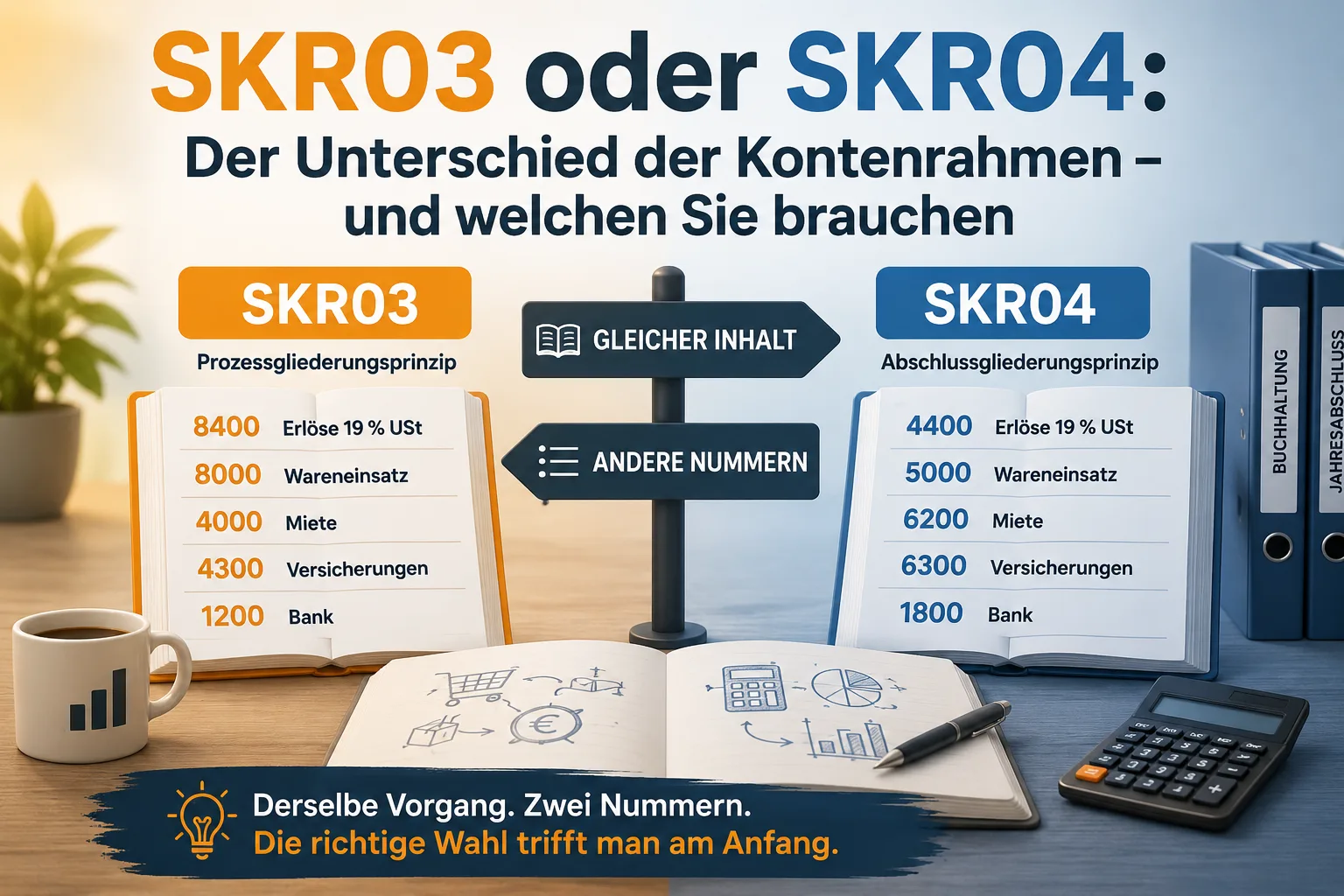
A chart of accounts is a list of numbers: every type of income and every type of cost gets a fixed number. SKR03 and SKR04 are two such lists – and they differ only in the order of the numbers, not in their content. Your revenue at 19 percent VAT is called 8400 in SKR03 and 4400 in SKR04. Same transaction, two numbers.
If you have a tax advisor, you are not really deciding anything: you adopt the chart their practice works with, otherwise your figures arrive there in the wrong place. If you have no tax advisor, choose SKR03 when you prepare a cash-basis income statement – in Germany the „Einnahmen-Überschuss-Rechnung" or EÜR, a simple comparison of income and expenses. Choose SKR04 when you prepare a balance sheet. More important than the choice itself is the timing: once the first bookings sit on your accounts, you can barely get out of that chart of accounts again.
This article provides general information and does not replace tax or legal advice.
Contents
- What SKR03 and SKR04 actually are
- The only real difference: the sorting
- Same booking, two numbers – the everyday accounts compared
- Which one do you take? One preliminary question and three cases
- Does the chart of accounts matter at all for an EÜR?
- Switching later: why that usually no longer works
- What happens if you chose a different one than your practice
- Setting the chart of accounts in office1.cloud
- Frequently asked questions
What SKR03 and SKR04 actually are
SKR stands for „Standardkontenrahmen", German for standard chart of accounts. The purpose: when you post to „8400" and your tax advisor reads „8400", both of you mean the same thing – revenue at 19 percent VAT. So 8400 is not an invention of your software but an entry in a list published by DATEV and updated every year.
The two lists in question are officially called:
- SKR 03 – „Standardkontenrahmen – Prozessgliederungsprinzip" (process-based structure), DATEV item no. 11174, valid for 2026
- SKR 04 – „Standardkontenrahmen – Abschlussgliederungsprinzip" (financial-statement structure), DATEV item no. 11175, valid for 2026
You can download both documents from DATEV free of charge. Both run to about 40 pages and list well over a thousand accounts each. You will need roughly twenty of them day to day.
A chart of accounts is not a legal requirement. The law requires your bookings to be traceable – it does not prescribe a number to you. SKR03 and SKR04 are the industry standard because tax advisors work with them, not because a statute names them.
Receipts, bank transactions and the export for your accountant are bundled in the Easy Invoice accounting software in one place.
The only real difference: the sorting
The names give it away. SKR03 is sorted by process, roughly following how money travels through a business: first what you own and what you have put in, then bank and cash, then purchasing, then costs, then revenue.
SKR04 is sorted by the annual financial statements. Its classes run in the same order as a balance sheet: fixed assets, current assets, equity, liabilities – followed by the profit and loss account with income before expenses.
This is what the ten account classes look like side by side. You do not need to know any of these terms – just notice how far the rows drift apart:
| Class | SKR03 | SKR04 |
|---|---|---|
| 0 | Fixed asset and capital accounts | Fixed asset accounts |
| 1 | Financial and private accounts | Current asset accounts |
| 2 | Accrual accounts | Equity accounts |
| 3 | Purchasing and inventory accounts | Liability accounts |
| 4 | Operating expenses | Operating income (revenue) |
| 5 | unused | Operating expenses (materials, purchasing) |
| 6 | unused | Operating expenses (payroll, other) |
| 7 | Inventory accounts (work in progress, finished goods) | Other income and expenses |
| 8 | Revenue accounts | unused |
| 9 | Carry-forward, capital, correction and statistical accounts | Carry-forward, capital, correction and statistical accounts |
From this follows the one rule of thumb that tells the two apart in case of doubt: in SKR03 your revenue starts with an 8, in SKR04 with a 4. If you see revenue with a leading 8 in a report, it is SKR03.
Same booking, two numbers – the everyday accounts compared
Most of your bookings run through these accounts. The numbers are taken from the DATEV charts of accounts for 2026.
| What for | SKR03 | SKR04 |
|---|---|---|
| Revenue 19 % VAT | 8400 | 4400 |
| Purchases 19 % input VAT | 3400 | 5400 |
| Bank | 1200 | 1800 |
| Cash | 1000 | 1600 |
| Trade receivables | 1400 | 1200 |
| Trade payables | 1600 | 3300 |
| Deductible input VAT 19 % | 1576 | 1406 |
| VAT payable 19 % | 1776 | 3806 |
| Low-value assets | 0480 | 0670 |
| Office supplies | 4930 | 6815 |
| Entertainment expenses | 4650 | 6640 |
| Travel expenses, owner | 4670 | 6670 |
| Depreciation on tangible assets | 4830 | 6220 |
Rows three and five show why a mix-up gets expensive: 1200 is your bank account in SKR03 and your open customer receivables in SKR04. The same number, two completely different meanings. A record imported under the wrong chart does not end up roughly right – it ends up somewhere else entirely.
Which one do you take? One preliminary question and three cases
Preliminary question: do you need a chart of accounts at all?
If you use your software purely to write invoices and carry your receipts to the practice in a shoebox once a year, then someone else does the posting – and the chart-of-accounts question only touches you at one point: as soon as you want to deliver data instead of paper.
But as soon as you record expenses in the program, run reports or export data, you assign an account to every line. From then on you need a chart of accounts, and from then on the decision is worth making.
Case 1: you have a tax advisor
Then the question is already answered – by them. Send an email asking which chart of accounts their practice keeps for you, and set exactly that one. One sentence is enough:
Hello, I am setting up my bookkeeping. Do you use SKR 03 or SKR 04 for me?
Two more details are needed anyway once you want to send them data: the advisor number and your client number. What else belongs in the handover is covered in our article on preparatory bookkeeping.
Case 2: you prepare a cash-basis income statement without a tax advisor
Take SKR03. Its structure follows what you are doing in your head anyway: money in, money out, what is left. Class 4 collects your costs, class 8 your revenue. Anyone preparing an EÜR never needs the balance-sheet logic of SKR04.
Who typically works this way: sole traders, freelancers, small businesses under the German VAT exemption of § 19 UStG, and small commercial operations below the bookkeeping thresholds of § 141 AO.
Case 3: you prepare a balance sheet
Take SKR04. A balance sheet contrasts what the business owns with what it owes – considerably more work than an EÜR. In SKR04 exactly these positions appear in the same order in which they later show up in the annual financial statements. That saves you and your advisor from re-sorting with every report.
Something often gets mixed up here: it is not the legal form that decides but the method of determining profit. A German GmbH always prepares a balance sheet, which is why SKR04 usually fits there. A sole trader may prepare one but mostly does not have to.
You are only obliged above certain thresholds. Under § 141 AO the bookkeeping obligation kicks in at total turnover of more than 800,000 euros in a calendar year or a profit from commercial operations of more than 80,000 euros in a financial year. For registered sole merchants, § 241a HGB names the same figures, measured there across two consecutive financial years.
One detail that reassures many people: the obligation does not start the moment you cross the threshold. Under § 141 (2) AO it applies only from the financial year following the tax office's notification. So you receive a letter before anything changes.
Does the chart of accounts matter at all for an EÜR?
Yes, but differently from what many expect. For the EÜR itself you do not need account numbers – you need totals per cost type. The numbers are the sorting system those totals come out of.
In practice that means: every expense you assign to an account thereby knows which line of the EÜR form it belongs to later. Fuel does not land in the right line because you typed „fuel", but because the account behind it is linked to an EÜR line. That link is exactly what the chart of accounts supplies.
For the reports built on it – EÜR, performance overview, VAT return – it makes no difference whether the number reads 4930 or 6815. What matters is that you do not change the assignment mid-year.
Switching later: why that usually no longer works
A chart of accounts is not a display setting you toggle. Every posted line hangs on an account of that chart. Switch the chart and the existing bookings lose their reference point – and your reports for the current year no longer add up.
Most programs therefore only allow the switch while nothing has been posted. office1.cloud does the same: as soon as bookings sit on accounts of the active chart, the switch is refused rather than quietly bending your data.
Hence the actual recommendation of this article: settle the question before the first booking, not once the first quarter is done. The call to the practice takes two minutes. Switching afterwards means setting up the accounting year again.
If you notice mid-year that you need the other chart, there are two workable routes: plan the switch for the next financial year, or clean up the current year together with your advisor. Both need discussing before you delete anything.
What happens if you chose a different one than your practice
The data import at the tax advisor's end allocates your bookings by account number. If the chart does not match, the figures are not rejected – they are posted incorrectly. Your revenue from account 8400 runs in SKR04 against a range that has nothing to do with revenue.
This can surface late, often only when a report looks implausible. The work then lands with the practice, and you pay for it. That is why the chart-of-accounts question is the first one you ask, not the last.
A second pitfall concerns changing practices: if your new advisor keeps SKR04 and your old one kept SKR03, that is no disaster for the past – closed years stay as they are. The switch gets planned for the new financial year.
Setting the chart of accounts in office1.cloud
In Easy Invoice you will find the setting under Settings › SKR chart of accounts. There you load SKR03 or SKR04 with one click and define which chart is active. Accounts you do not need can be hidden; you can add your own on top. Mark frequently used ones as favourites so they appear at the top when assigning.
What you need to know:
- The bookkeeping function with a chart of accounts is included from the Standard plan upwards.
- The chosen chart drives the account numbers in the DATEV export to your tax advisor.
- The switch is blocked as soon as bookings exist – see above.
- Easy Invoice does not produce a balance sheet. If you prepare one, SKR04 here mainly ensures that your data arrives correctly at the practice.
How the assigned accounts show up in your reports is covered in Creating a BWA yourself. How the assignment works in everyday document handling is described in Managing incoming invoices.
Frequently asked questions
What is the difference between SKR03 and SKR04 in one sentence? SKR03 sorts the accounts by business process, SKR04 by the structure of the annual financial statements – the transactions are the same, only the numbers differ.
SKR03 or SKR04 for a sole trader? Anyone preparing an EÜR does well with SKR03. If you prepare a balance sheet voluntarily, SKR04 fits better. If your practice has already set up a chart for you, their setting applies.
SKR03 or SKR04 for small businesses under § 19 UStG? SKR03. Under the German small-business rule you prepare an EÜR, and the balance-sheet sorting of SKR04 brings you nothing. What belongs on your invoices is covered in Writing an invoice without VAT.
SKR03 or SKR04 for freelancers? Freelancers determine their profit under § 4 (3) EStG via an EÜR and are not subject to the bookkeeping obligation. That makes SKR03 the obvious chart. Whether you count as a freelancer at all is clarified in Freelancer or trade business.
SKR03 or SKR04 for a GmbH? A GmbH prepares a balance sheet, which is why SKR04 is usually kept in practice. It is not mandatory – what matters is what your practice works with.
Can I switch the chart of accounts mid-year? Technically almost never, sensibly even more rarely. Once bookings exist they hang on the accounts of the active chart. Plan the switch for the next financial year and discuss it with your advisor beforehand.
Where do I get the complete list of accounts? Directly from DATEV as a PDF: SKR 03 under item no. 11174, SKR 04 under item no. 11175, each with the year stated. Watch the year – the charts are updated annually.
Are there other charts besides SKR03 and SKR04? Yes, DATEV maintains further charts for particular industries and legal forms. For small businesses and the self-employed, practically every route runs through SKR03 or SKR04.
Handle invoices more easily
Easy Invoice combines quotes, invoices and customer management in the cloud.
Try Easy InvoiceRead next
 Invoicing & Accounting
Showing a discount on an invoice in Germany: template, VAT, example
A discount is deducted from the net amount, and VAT is calculated afterwards. Here are two templates to copy, the rules for discount codes and vouchers, and what applies if you grant the reduction only after the invoice.
 Invoicing & Accounting
Freelancer invoices in Germany: template, required details, VAT
As a freelancer (Freiberufler) in Germany, you write invoices without registering a trade, but with the same mandatory details as any business. One question decides: do you add VAT or not? Here you find the answer for your case and a template for each of the three cases.
 Invoicing & Accounting
Retention periods 2026: invoices, receipts and what may go in 2027
Since 2025, eight instead of ten years have applied to invoices and other accounting vouchers (Buchungsbelege). The table shows all periods, when they start, when they run longer and which folders you may clear out at the start of 2027.